
Trauma Lab Public Build vs Supporter Playtest: Guide
Trauma lab public build vs supporter playtest explained: compare public v1.19, $5 supporter perks, early updates, Discord role, and the Steam launch key.
Jump to
Trauma lab Public Build vs Supporter Playtest: What Changes?
Trauma lab public build vs supporter playtest comes down to playing the public version or paying $5 for development benefits, including latest-build access and playtesting. That distinction matters because public v1.19 already includes sandbox tools and a rebuilt Story mode. Use this Trauma lab public build vs supporter playtest comparison to separate what you can play now from the benefits attached to supporting development.
Trauma lab is still in development. The public game gives you an anatomy-focused physics sandbox with weapons, medical tools, props, chemicals, and powers. The supporter option adds access to future updates as they become available, a special Discord role, participation in playtests, and a Steam key when the game launches there.
| Detail | Public build | $5 supporter option |
|---|---|---|
| Current public version | v1.19 | Access to the latest builds as they become available |
| Sandbox content | Tools, props, medical systems, chemicals, and powers in v1.19 | Playtesting of new content during development |
| Story mode | Rebuilt three-room mode in v1.19 | Participation in development playtests |
| Discord benefit | — | Exclusive Supporter role |
| Steam launch benefit | — | Steam key when Trauma lab launches on Steam |
The useful distinction is access and participation. Explore the public game to learn its systems; choose the supporter option if you want the update and playtest benefits while helping fund development.
Keep that distinction in mind when reading older discussions about locked content. Public v1.19 already has Story mode, so paying for supporter access is not the step required to enter that version’s three-room scenario.
What You Can Play in Public v1.19
The public side of Trauma lab public build vs supporter playtest includes both open-ended sandbox experimentation and a Story scenario with movement, weapons, cover, and environmental threats.
The sandbox tools
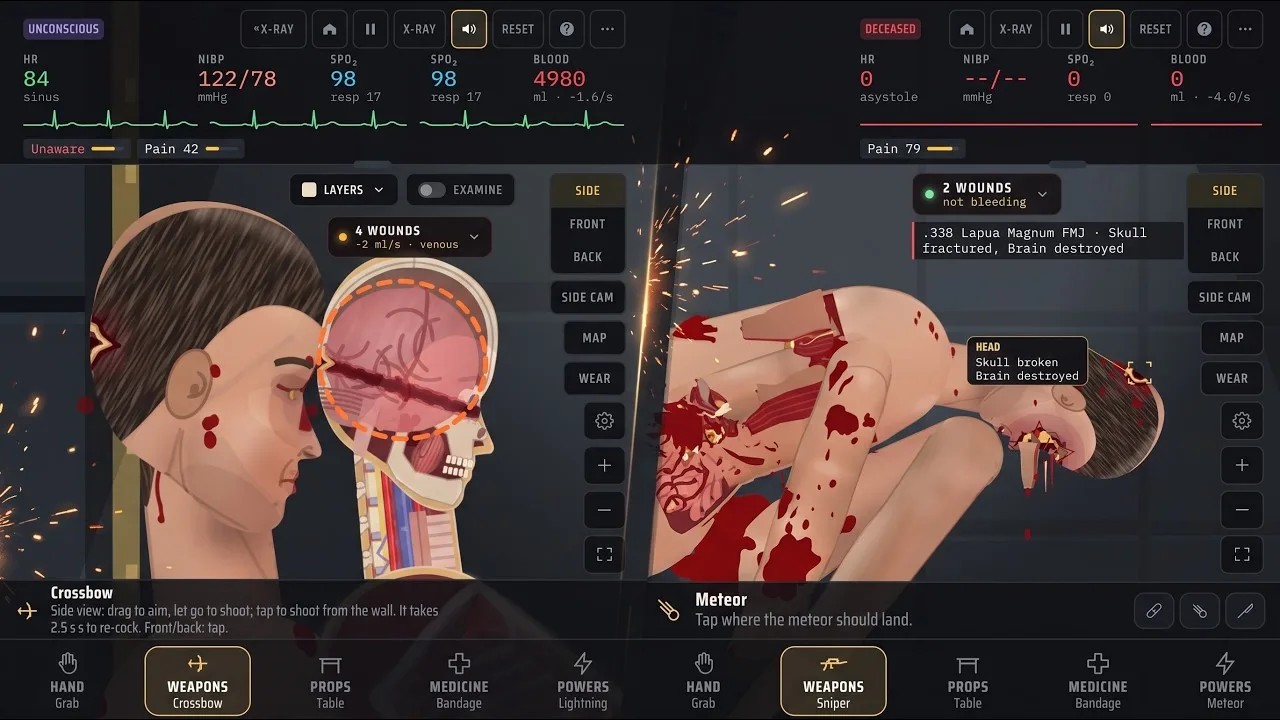
Sandbox mode combines injury simulation with tools for examining and treating the subject. You can switch between side, front, and back views, inspect the body with X-ray, display an organ chart, and adjust the simulation speed.
The tool selection stretches well beyond firearms. Grab lets you move body parts and objects; Rope attaches the subject to surfaces or objects; props include a hospital gurney, table, chair, and fillable pool. Chemicals and beakers add another set of interactions.
On the treatment side, different tools handle different problems. Suture closes wounds, while Surgery addresses internal bleeding. Bone plate repairs fractures, and Transplant can replace damaged organs or reattach limbs. These are game systems, rather than real-world treatment instructions.
Explore those distinctions before assuming you need another version for more depth. For example, use X-ray and the organ chart to examine damage, then read the relevant tool descriptions instead of repeatedly applying the same treatment.
The rebuilt Story mode
Public v1.19 contains three Story rooms:
| Room | Contents and encounters |
|---|---|
| Cell | Medicine cabinet, pistol, knife, and crowbar |
| Storage | Guard and steel crate |
| Security | Sentry gun and jammed exit door |
The guard uses the same underlying body systems as the player, including organs, bleeding, wounds, and a soft vest. In v1.19, this guard does not move or fight back yet.
The sentry presents a different problem. Its red beam sweeps up and down, and it fires after detecting you. Stay low behind cover, shoot it, or kick it over. Those options give the room an actual positioning problem instead of making every encounter a standing exchange of shots.
Cover also has a specific interaction: press Q beside a steel crate to sit with your back against it. Aiming over the crate allows blind fire with much lower accuracy.
Movement received changes, too. Starting and stopping are quicker, crouching and getting up are faster, and repeated jumping no longer causes the earlier glitches. The character faces the direction of weapon aim, allowing backward movement, and can shoot while lying down.
These public features matter when deciding whether to support the game. Try the existing mechanics to understand the direction of development before paying for closer involvement.
What the $5 Supporter Option Includes
The paid side of Trauma lab public build vs supporter playtest centers on following development as it happens. The supporter package combines build access, community recognition, playtesting, and a future Steam benefit.
Latest-build access
Supporters receive future updates as soon as they become available. That connects the purchase to ongoing development rather than just the public version visible when you discover the game.
Choose this benefit for access to changes as the project grows. Keep the version number alongside any feedback you send, especially when discussing an interaction that changed between updates.
For example, public v1.19 changes Story movement and cover behavior. Feedback about aiming while lying down is much more useful when it identifies the version and mode involved.
Playtest participation
Supporters can join playtesters, try new content, and contribute feedback during development.
Make that participation useful by describing the action that produced a problem. “The camera flickers” gives less direction than identifying the view, camera action, platform, and build involved. Describe what you expected to happen and what happened instead.
Keep feature requests separate from bug descriptions. Asking for another tool and explaining a broken interaction serve different purposes, even when both belong in development feedback.
Discord Supporter role
The package includes an exclusive Supporter role on the official Discord server. This is the community recognition attached to supporting Trauma lab.
Treat the role and playtest access as separate benefits when deciding what matters to you: one identifies your supporter status, while the other involves trying content and helping shape development.
Steam key at launch
Supporters are promised a Steam key when Trauma lab launches on Steam.
Read that timing literally: the key is a launch benefit. The current development benefits are latest-build access, the Discord role, and playtesting.
For the Trauma lab public build vs supporter playtest decision, separate those timeframes. Decide whether the development benefits interest you now, then consider the Steam key as part of the package’s later value.
Platforms, Controls, and Performance
Trauma lab lists HTML5, Windows, and Android platforms. The public browser game runs in HTML5, while downloadable options sit alongside the game’s ongoing development.
When comparing versions, keep platform and game mode attached to the behavior you are discussing. A browser session on a phone, a Windows download, and Story mode controls involve different practical considerations.
Learn the controls for your mode
Sandbox has shortcuts for selecting categories, inspecting the subject, changing views, and controlling time. Story uses its own interactions, including the cover action.
| Default control | Sandbox action |
|---|---|
| 1 | Hand tools |
| 2 | Weapons |
| 3 | Props |
| 4 | Medicine |
| 5 | Powers |
| Q / E | Previous / next tool in the current tab |
| Tab | Open the tool menu |
| X | X-ray |
| Z | Examine with X-ray |
| C | Organ chart |
| V | Cycle side, front, and back views |
| Space | Pause or resume |
The Q difference is especially easy to overlook: it selects the previous tool in sandbox, but activates cover beside a steel crate in Story. Keys are remappable, so check your bindings if an instruction does not match your setup.
Use pause while learning the sandbox interface. Switch views and inspect the subject before continuing an experiment, rather than trying to locate every control while the simulation runs.
Adjust the settings that address your problem
Performance belongs in the Trauma lab public build vs supporter playtest comparison because the public game has already received phone-focused rendering changes.
| Version or setting | What changes |
|---|---|
| v1.17 body lighting | Lighting is prepared on the skin instead of redrawn across the body every frame |
| v1.17 floor shadows | A prepared shadow replaces repeated shadow work |
| v1.17 skin texture | Texture preparation happens at load |
| Gore level | Lowering it is the developer’s advice for lag |
| Hit label, added in v1.18 | Toggle through Options → Interface → On screen → Hit label |
The v1.17 phone optimization cuts the work per frame roughly in half compared with the preceding rendering approach. That is a description of the rendering improvement, rather than a fixed frame-rate promise for every phone.
Lower the gore level if the game lags. Turn off the hit label if you want to remove the marker attached to the newest wound; that preference is remembered.
How to Choose and Get Started
Make your Trauma lab public build vs supporter playtest choice around the features you want to use and the role you want in development.
Start with the public game to explore sandbox interactions and the v1.19 Story rooms. Try the examination tools, move between views, and spend time with the cover and aiming controls. That gives you concrete mechanics to evaluate before deciding whether ongoing playtest participation appeals to you.
If the supporter benefits fit what you want, open the official Trauma lab game and supporter page to support the project for $5.
Before moving between builds, keep a simple checklist:
- Identify the version. Include it when discussing a feature or reporting a bug.
- Identify the platform. Say whether you are using HTML5, Windows, or Android.
- Name the mode. Distinguish sandbox behavior from Story interactions.
- Describe the steps. Explain the tool, view, or action involved.
- Name the result. Separate a visual problem, control problem, or performance issue from a feature request.
For example, a camera issue needs the active view and whether you were moving or zooming. A Story cover issue needs the crate interaction and your current key binding. Those details make feedback actionable without requiring a long description of the entire session.
Support the game because its latest-build access, playtests, community role, and future Steam key interest you. Use the existing public content to decide how much you enjoy the simulation and its developing Story systems.
FAQ
What is the difference in Trauma lab public build vs supporter playtest?
Public v1.19 includes the sandbox and rebuilt three-room Story mode. The $5 supporter option adds latest-build access, development playtesting, an exclusive Discord Supporter role, and a Steam key when the game launches there.
Is Story mode available in the public build?
Yes. Public v1.19 includes a cell, storage room, and security room. The scenario contains equipment, a stationary guard, a steel crate for cover, and a sentry that detects the player with a sweeping red beam.
Does becoming a supporter include a Steam key?
Yes. The supporter package includes a Steam key when Trauma lab launches on Steam. It also includes development benefits such as access to updates and participation in playtests.
What should I change if Trauma lab runs slowly on my phone?
Lower the gore level in the options menu. Public v1.17 also introduced phone-focused optimizations to body lighting, floor shadows, and skin texture preparation, reducing the rendering work per frame compared with the preceding approach.
Continue with
 Trauma Lab Roadmap: V1.19 Updates and What's AheadExplore the Trauma Lab roadmap, v1.19 Story mode, mobile performance fixes, and $5 Supporter benefits. See what changed and how to follow future updates.
More in Versions
Trauma Lab Browser vs Download: Versions Explained
Trauma lab browser vs download: compare HTML5, Windows, and Android options, explore v1.19 features, and get practical tips for controls and smoother play.
Trauma Lab How to Update: Get the Latest Game Build
Trauma lab how to update guide for browser, Windows, and Android users. See v1.19 changes, Supporter access, and settings for smoother play after updates.
Trauma Lab Patch Notes: V1.19 Changes and Bug Fixes
Trauma lab patch notes cover v1.19 Story mode, guard behavior, cover controls, HUD changes, and mobile performance fixes. See what changed before you play.
Trauma Lab Versions Guide: V1.19 Changes and Platforms
Use this Trauma lab versions guide to compare browser, Windows, and Android options, explore v1.19 Story changes, and understand updates before you play.
Continue exploring
Join the community
Official channels for news, updates and player help: