
Trauma Lab Versions Guide: V1.19 Changes and Platforms
Use this Trauma lab versions guide to compare browser, Windows, and Android options, explore v1.19 Story changes, and understand updates before you play.
Jump to
Which Trauma Lab Version Should You Look For?
Trauma Lab v1.19 rebuilds Story mode around three rooms, a guard, and a sentry watching your escape route. This Trauma lab versions guide separates those gameplay updates from browser, Windows, and Android platform choices, helping you understand what each label means. Keep this Trauma lab versions guide handy when switching modes: cover controls, weapon handling, and the sandbox’s tool shortcuts serve different purposes.
The key distinction is between platform and build number. HTML5, Windows, and Android describe how you access the game. A number such as v1.19 identifies a particular update and its gameplay changes.
| Platform or access option | What it means |
|---|---|
| HTML5 browser game | Trauma Lab runs as a browser game |
| Windows | Windows is a supported downloadable platform |
| Android | Android is a supported downloadable platform |
| Supporter access | A $5 supporter option includes access to the latest builds and playtests |
Start at the official Trauma Lab game page to play, download, or support development. Match any version-specific instructions you follow to the build you open, particularly when a guide discusses Story mode or the interface.
Trauma Lab remains in development. Its recent updates cover both new gameplay and revisions to existing systems, so an older screenshot can look different even when familiar sandbox tools remain available.
What Changed in v1.17, v1.18, and v1.19?
The recent update sequence addresses three distinct parts of the experience: interface and performance, wound-label visibility, and Story mode. This Trauma lab versions guide focuses on those practical differences rather than treating every patch as a completely different game.
| Version | Main changes | What changes during play |
|---|---|---|
| v1.17 | Classic HUD restored; body lighting, shadows, and texture preparation optimized | Familiar top-bar controls return, with reduced rendering work on phones |
| v1.18 | Hit label toggle added | You can hide the label attached to the newest wound |
| v1.19 | Story mode rebuilt; movement, cover, weapon handling, and birdshot revised | Three rooms introduce a guard, steel-crate cover, and a scanning sentry |
v1.17: Familiar Buttons and Phone Performance
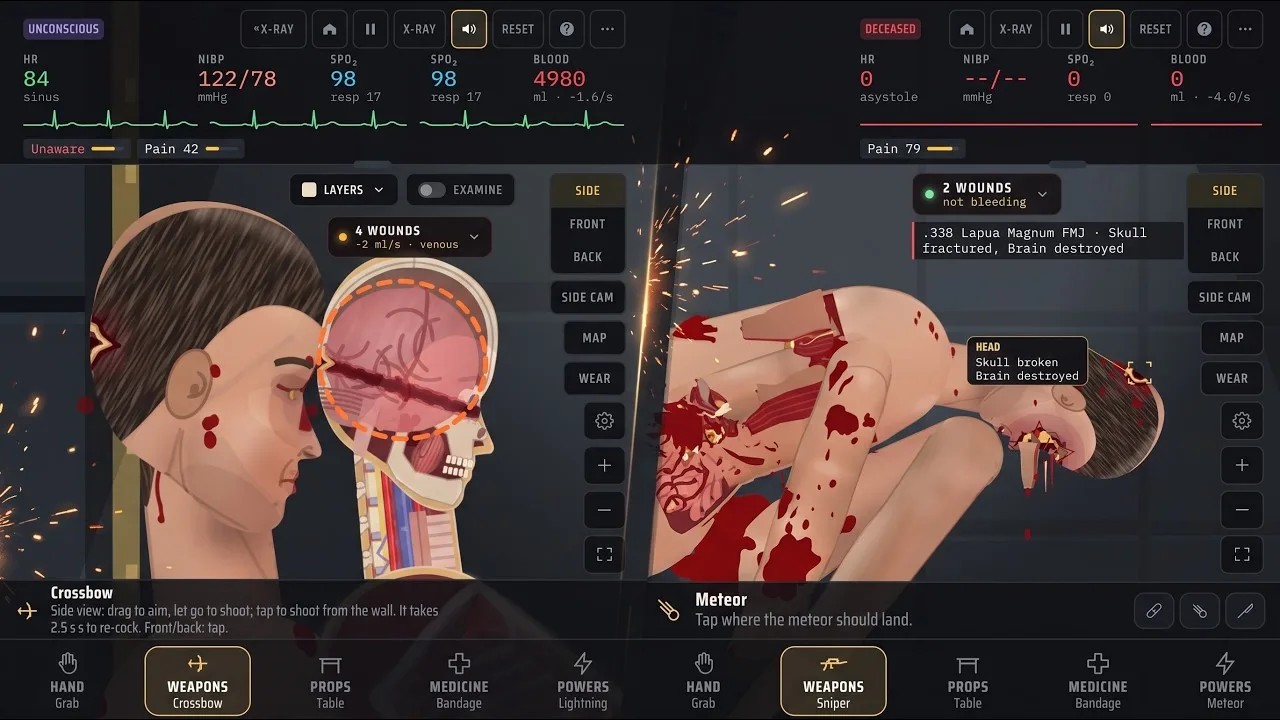
In this Trauma lab versions guide, v1.17 marks the return of the HUD arrangement used before v1.16. The top bar brings back Side, Front, Back, Side cam, Map, Wear, zoom controls, and full ammunition names.
The visual redesign is still present. The subject’s updated appearance, scenes, weapon artwork, wound chip, and wound label remain, even though the interface returns to its earlier arrangement.
Performance changes reduce repeated rendering work. Body lighting is prepared once instead of redrawn across the entire body every frame, floor shadows use a prepared shadow, and the skin texture is prepared at load. On phones, the update describes roughly halving the work per frame and returning to v1.14’s speed. That comparison is not a fixed frame-rate target for every device.
v1.18: Control the Wound Label
Version 1.18 adds Options → Interface → On screen → Hit label. The label identifies the newest wound’s entry location and what it struck.
It starts enabled, and the game remembers your choice. Turn it off if the marker obstructs the body area you want to inspect; leave it enabled when tracking individual hits.
v1.19: Story and Combat Changes
Version 1.19 expands the playable Story setup and changes how movement, aiming, and cover interact. It also adjusts birdshot: each pellet carries about 5 J, producing numerous shallow wounds. Close-range blasts remain dangerous, while distant shots no longer cut major arteries across the room.
How v1.19 Story Mode Works
Story mode is the largest gameplay topic in this Trauma lab versions guide because v1.19 changes the space you move through and the threats inside it. The rebuilt mode contains your cell, Storage, and Security.
| Room | Contents | Relevant interaction |
|---|---|---|
| Your cell | Medicine cabinet, pistol, knife, and crowbar | These items are present in the starting room |
| Storage | A guard and a steel crate | The crate supports the new cover mechanic |
| Security | A sentry gun and the jammed exit door | The sentry scans with a red beam before firing |
The guard uses the same kind of body simulation as your character, including organs, bleeding, wounds, and a soft vest. In v1.19, this guard stays in place and does not fight back.
The sentry behaves differently. Its red beam sweeps up and down, and it fires after the beam finds you. Stay low behind cover, shoot the sentry, or kick it over.
Use Cover and Aiming Together
Press COVER (Q) beside a steel crate to sit with your back against it. Your character is hidden while in that position. Aiming over the crate allows blind fire, but accuracy drops substantially.
Use the crate’s protection when the sentry’s beam threatens your position. Account for the accuracy penalty before relying on blind shots to hit a specific target.
Facing also matters. With a weapon equipped, your character turns toward the aiming direction. Walking in the opposite direction becomes backward movement. Aim toward the threat while repositioning to keep your weapon facing it.
Adjust to the Revised Movement
Version 1.19 makes starting and stopping quicker, along with crouching, lying down, and getting back up. It also fixes repeated-jump glitches and the problem that could launch the character into the ceiling while jumping with a drawn gun.
The pistol rests at a lowered ready position until you aim or fire. Shooting while lying down is supported, giving low movement and cover a direct connection to combat.
For the knife, the Story instruction is straightforward: FIRE stabs whatever is ahead of you. Keep that separate from the sandbox’s drag-and-swing knife handling.
Controls and Tools: Keep Story and Sandbox Separate
One shortcut can do different jobs across modes. In Story, Q activates cover. In the sandbox, Q selects the previous tool within the current tab.
Use this Trauma lab versions guide as a reminder to check the mode before applying a control tip. The following bindings are the default sandbox keys, and keys are remappable.
| Sandbox action | Default key |
|---|---|
| Hand tools / Weapons / Props / Medicine / Powers | 1 / 2 / 3 / 4 / 5 |
| Previous tool / Next tool | Q / E |
| Switch tool mode | F |
| Open tool menu | Tab |
| X-ray / Examine with X-ray | X / Z |
| Cycle Side → Front → Back | V |
| Pause or resume | Space |
| Slow down / Speed up | Left Arrow / Right Arrow |
| Zoom in / Zoom out / Fit to screen | Equals / Minus / 0 |
| Open Options | O |
View selection affects tool handling as well. In the sandbox’s side view, the knife is held by its handle and swung, with thrusting used to stab. The machete uses swings in side view and swipes in front or back view. The axe uses swings from the side and taps from the front or back.
Read the selected tool’s hint after changing views. A familiar weapon icon does not mean its input stays identical across camera angles.
Distinguish Similar Medical Tools
The current sandbox includes several tools with separate jobs. Suture closes a wound and ties off torn vessels there, but deep internal bleeding continues. Surgery addresses bleeding vessels and organs within the selected body part and removes bullets there.
Likewise, Super serum and Ultra serum have different descriptions. Super serum provides regeneration. Ultra serum brings back the dead and regrows lost limbs. Choose Ultra serum when experimenting with those specific effects.
The Inhibitor cancels drugs, serums, poisons, and viruses. Use it when you want to stop those active effects rather than adding another substance.
Platform Choices, Lag Settings, and Supporter Access
For platform decisions, separate access from performance settings. The HTML5 game, Windows download, and Android download are platform options; gore level is an in-game setting that affects the workload during play.
The developer’s lag advice is to lower the gore level in Options. Reduce that setting if the simulation slows down, especially when detailed injury effects are filling the scene.
Version 1.17’s optimizations also matter for phone play. Its lighting, shadow, and texture changes reduce recurring rendering work, while removing the thin rim light along the subject’s back. Keep those improvements separate from the Hit label option: hiding the label changes interface visibility, while lowering gore is the stated advice for lag.
The paid supporter option is another access choice covered by this Trauma lab versions guide.
| Supporter benefit | What the $5 option includes |
|---|---|
| Latest builds | Access to future updates as they become available |
| Discord supporter role | A dedicated role in the official Discord community |
| Playtest access | Participation in testing new content |
| Steam key at launch | A Steam key when Trauma Lab launches on Steam |
Supporter access covers development benefits and a future Steam key. The key is tied to the Steam launch, so distinguish that benefit from the browser game and downloadable platforms already offered.
Use the official Trauma Lab download and supporter page when choosing an available download or purchasing supporter access.
Before following an older control explanation, make a quick comparison:
- Match its build number to your game.
- Separate Story instructions from sandbox shortcuts.
- Check whether it uses side, front, or back view.
- Lower gore in Options if lag interrupts play.
- Use the Hit label toggle to control wound-marker visibility.
Those distinctions explain why two sets of instructions can describe different inputs without referring to different platform editions.
FAQ
Which update does this Trauma lab versions guide cover?
The main gameplay update covered here is v1.19, including its rebuilt three-room Story mode. The guide also explains v1.18’s Hit label toggle and v1.17’s restored HUD and phone performance changes.
Is Story mode playable in Trauma Lab v1.19?
Yes. Version 1.19 includes your cell, Storage, and Security. The setup contains a stationary guard, steel-crate cover, and a sentry gun that scans with a red beam before firing.
What should I change if Trauma Lab lags on my phone?
Lower the gore level in Options. Version 1.17 also introduces phone performance improvements by reducing repeated work for body lighting, shadows, and skin textures.
Does the $5 supporter option include a Steam key?
Yes. The supporter package includes a Steam key when Trauma Lab launches on Steam, along with access to the latest builds, playtesting, and an official Discord supporter role.
Continue with
 Trauma Lab Browser vs Download: Versions ExplainedTrauma lab browser vs download: compare HTML5, Windows, and Android options, explore v1.19 features, and get practical tips for controls and smoother play.
More in Versions
Trauma Lab How to Update: Get the Latest Game Build
Trauma lab how to update guide for browser, Windows, and Android users. See v1.19 changes, Supporter access, and settings for smoother play after updates.
Trauma Lab Patch Notes: V1.19 Changes and Bug Fixes
Trauma lab patch notes cover v1.19 Story mode, guard behavior, cover controls, HUD changes, and mobile performance fixes. See what changed before you play.
Trauma Lab Public Build vs Supporter Playtest: Guide
Trauma lab public build vs supporter playtest explained: compare public v1.19, $5 supporter perks, early updates, Discord role, and the Steam launch key.
Trauma Lab Roadmap: V1.19 Updates and What's Ahead
Explore the Trauma Lab roadmap, v1.19 Story mode, mobile performance fixes, and $5 Supporter benefits. See what changed and how to follow future updates.
Join the community
Official channels for news, updates and player help: