
Trauma Lab Skin Guide: Burns, Wounds, and Healing Tips
Learn how Trauma lab skin damage works in v1.19, compare bandages, Burn gel, and Graft, and use sandbox controls to inspect wounds and treat burns in-game.
Jump to
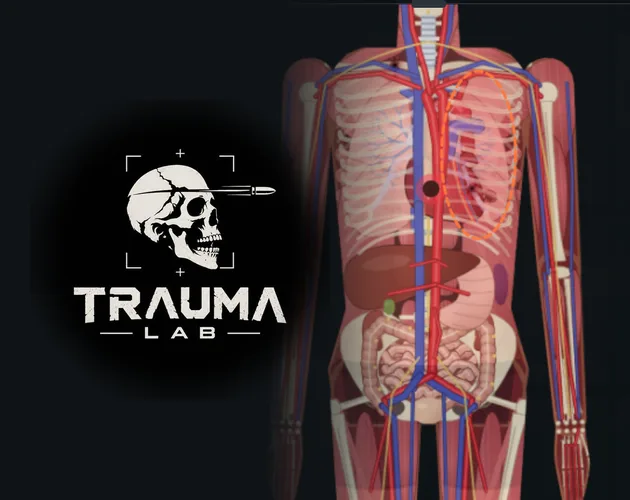
How Trauma Lab Skin Works in v1.19
Trauma lab skin damage can leave you choosing between dressing a wound, treating a burn, and rebuilding missing tissue. That choice matters because closing the surface does not stop deep internal bleeding. This Trauma lab skin guide explains the v1.19 tools, inspection controls, and regeneration options so you can match the treatment to the injury.
Skin is part of the subject’s simulated anatomy, with visible wounds and burns that interact with the medical tools. A scrape, an open wound, and a deep tissue defect call for different responses. The game also separates surface treatment from procedures that address damaged vessels, organs, or bones.
Everything below concerns the game’s simulation and its v1.19 sandbox controls, not real medical treatment.
Read the injury before choosing a tool
Start by looking at how the damage was created. Different tools have distinct injury descriptions, giving you a useful starting point for inspection.
| Damage example | Behavior in the game | What to inspect |
|---|---|---|
| Baseball bat | Causes characteristic bruises and fractures | Surface marks and underlying bones |
| Steel pipe | Scrapes and splits skin | The visible wound and deeper damage |
| Acid power | Continues damaging tissue for a few seconds | The affected area as the effect develops |
| Radiation capsule | Burns the skin facing the capsule | The exposed side of the body |
Use these distinctions to avoid treating every visible mark the same way. A dressing addresses wounds at the surface, while a fracture has its own repair tool.
For Trauma lab skin injuries, separate three questions: Is there an open wound? Is the skin burned? Is tissue missing? Then inspect beneath the surface before deciding whether the subject also needs Surgery, a Bone plate, or another intervention.
Inspect Skin and Underlying Damage With Sandbox Controls
The sandbox gives you several ways to examine the same injury. Side, front, and back views change your angle, while X-ray and Examine help you investigate beneath visible damage.
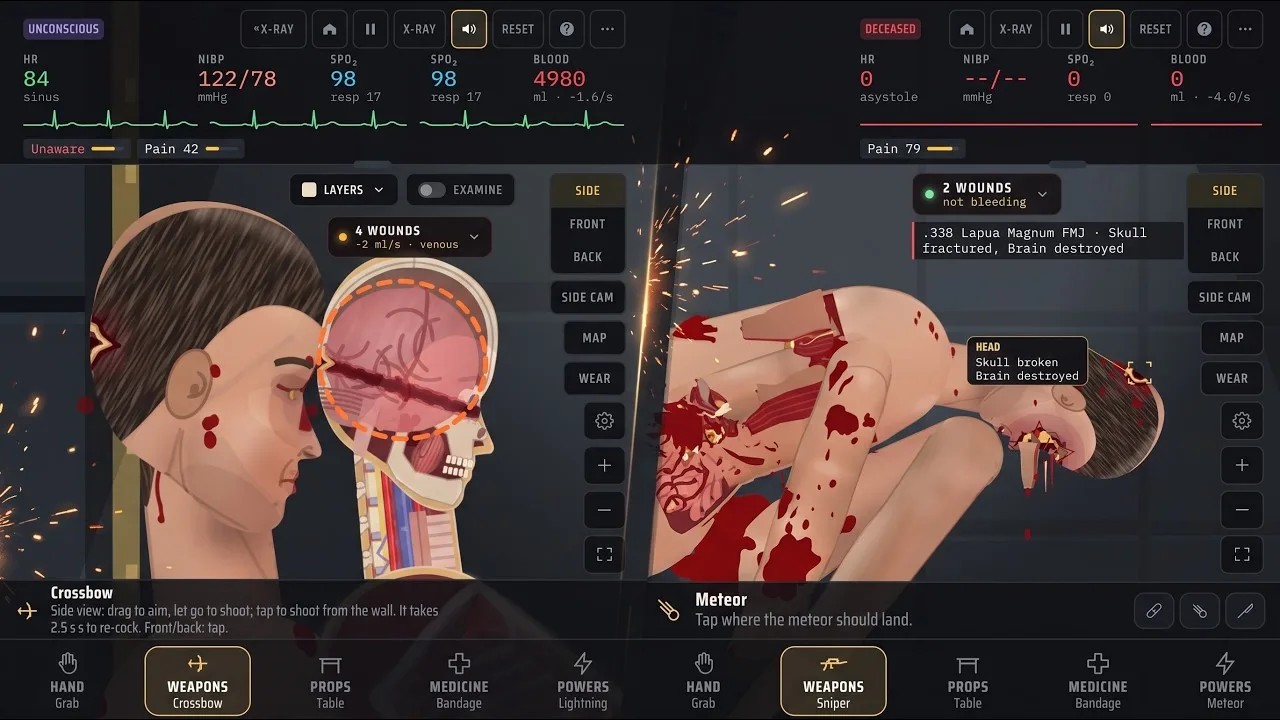
These are the default sandbox bindings in v1.19. Keys are remappable, and Story mode uses different controls.
| Action | Default key | Function |
|---|---|---|
| Open Medicine | 4 | Selects the Medicine tab |
| Open the tool menu | Tab | Opens tool selection |
| Toggle X-ray | X | Enables the X-ray view |
| Examine with X-ray | Z | Uses Examine alongside X-ray |
| Display bullet paths | T | Shows bullet paths |
| Open the organ chart | C | Displays the organ chart |
| Cycle views | V | Cycles side, front, and back views |
| Pause or resume | Space | Pauses or resumes the simulation |
| Fit to screen | 0 | Fits the scene to the screen |
You can also use Grab to tap a body part and examine it. The Move tool handles camera movement: drag to pan, then scroll or pinch to zoom.
Follow a simple inspection sequence
- Pause the simulation. Use the pause control to take time over your inspection.
- Check another angle. Cycle through the available views to look at the affected body region.
- Enable X-ray and Examine. Inspect underlying damage instead of judging the injury entirely by its surface.
- Check bullet paths after gunfire. Follow the projectile’s route when examining a gunshot injury.
- Choose a treatment for each problem. Keep wound closure, internal repair, and bone repair separate.
The newest wound can also receive an on-screen hit label identifying the entry location and what was struck. In v1.19, this label is enabled by default. Its toggle is under Options → Interface → On screen → Hit label, and the game remembers your choice.
Keep that label enabled while learning the relationship between Trauma lab skin damage and internal injuries. Turn it off through the interface setting when you prefer a clearer view of the subject.
Match Bandage, Burn Gel, and Graft to the Injury
The Medicine tab contains several tools that act on wounds, but their jobs differ. Bandage covers an injured area, Suture closes a wound, and Graft handles larger tissue defects. Burn gel has a separate role in treating burns.
| Tool | Action in v1.19 | Important distinction |
|---|---|---|
| Bandage | Tap to dress a wound; drag to wrap the body | Wrapping covers wounds and burns underneath |
| Burn gel | Tap or rub over burned skin | Heals first- and second-degree burns; third-degree burns require Graft |
| Gauze pack | Packs deep wounds, craters, and stumps | Works on injuries that cannot be stitched |
| Graft | Covers a large wound, crater, or stump with a skin graft | Also cleans the area and ties off vessels; sedate first |
| Suture | Stitches a wound and ties off torn vessels there | Deep internal bleeding continues |
| Surgery | Repairs internal bleeding in the selected body part | Also repairs bleeding organs and removes bullets there; sedate first |
| Forceps | Removes a lodged gray bullet | Retained bullets cause pain and slow bleeding |
Dress wounds or close them
With Bandage selected, tap a wound to apply a dressing. Drag along the body when you want to wrap an area and cover the wounds and burns beneath it.
Suture performs a different action: it closes the selected wound and ties off vessels at that location. Its limitation matters whenever the injury extends deeper. Stitching the surface does not stop deep internal bleeding.
After closing a wound, inspect the affected body part again rather than assuming every problem there has been resolved. Use Surgery for internal bleeding when that is the injury you need to address.
For embedded projectiles, select Forceps and tap the gray bullet. Surgery also removes bullets from the body part being operated on.
Treat burns by depth
Burn gel cools the affected skin, reduces pain, stops fluid loss, and heals first- and second-degree burns in the simulation. Apply it with a tap, or drag over the burned skin to rub it in.
Third-degree burns require Graft. That distinction is central to Trauma lab skin treatment: repeating a surface treatment does not change the tool’s stated role.
If the subject is still burning, use Extinguisher over the flames. Its spray works while held, and lying down also smothers fire. Address the active flames before focusing on the resulting burns.
Handle missing tissue separately
Use Gauze pack for deep wounds, craters, and stumps that cannot be stitched. Use Graft when the injury needs missing tissue rebuilt and the area covered.
The Graft procedure also cleans the wound and ties off vessels within it. Sedate the subject before using it. Midazolam provides sedation and calms writhing in the game; Flumazenil reverses its effect.
Keep limb reattachment separate from skin coverage. Transplant can sew a severed limb back on when you tap the stump or detached limb. Graft covers a stump, while Transplant provides the reattachment action.
Understand Regeneration and Its Limits
Trauma lab skin repair also includes experimental serums, but the two regeneration tools have different descriptions. Choose between ordinary wound treatment, regeneration, and limb restoration by the result you need.
| Tool | Stated effect in v1.19 | Distinction to remember |
|---|---|---|
| Super serum | Makes the body regenerate | Its description focuses on regeneration |
| Ultra serum | Revives the dead and regrows lost limbs | Explicitly includes revival and limb regrowth |
| Inhibitor | Instantly cancels drugs, serums, poisons, and viruses | Cancels serum effects along with other substances |
| Rad antidote | Removes radiation, rebuilds marrow, and heals radiation burns | Specifically addresses radiation damage |
Do not swap Super serum and Ultra serum simply because their names sound similar. Ultra serum explicitly includes revival and lost-limb regrowth. Use that distinction when choosing a tool for those outcomes.
Inhibitor also deserves attention during experiments. Its effect includes every serum, so using it cancels the regeneration substances you have introduced along with drugs, poisons, and viruses.
Keep experiments easy to understand
Change one treatment at a time when comparing how the tools behave. Inspect the injury, apply the selected tool, and examine the affected area again. This keeps your attention on the relationship between the damage and the intervention.
Use the dedicated treatment when learning a particular system. Practice Burn gel on burns, Suture on wounds that can be closed, and Graft on the tissue defects it handles. Then compare those targeted actions with the broader regeneration options.
For radiation burns, remember that the injury has a dedicated antidote. Rad antidote addresses radiation exposure, marrow damage, and the resulting burns together.
Keep Skin Detail Readable and Manage Performance
Trauma lab skin rendering received a performance change in v1.17 that remains relevant to v1.19. Body lighting is prepared once instead of being redrawn across the subject every frame, and the skin texture is prepared at load. Floor shadows also use a prepared shadow.
On phones, that update described roughly halving the work per frame and returning performance to the v1.14 level. That is a rendering improvement, not a fixed frame-rate promise for every device.
If the game lags, lower the gore level in Options. This is the developer’s troubleshooting step for lag and gives you a direct setting to adjust before continuing.
For easier inspection:
- Use 0 to fit the scene back to the screen.
- Select Move when you need to pan or zoom.
- Pause while comparing an injury with the available medical tools.
- Adjust the hit-label toggle when its overlay interferes with your view.
Trauma lab skin injuries become easier to manage when you separate what you see from what you need to repair. Inspect the region, select the tool for that specific damage, and check beneath the surface whenever internal injuries are involved.
To play or download the game, visit the official Trauma Lab game page. The game is in development, with HTML5, Windows, and Android platforms.
FAQ
How do you heal Trauma lab skin burns?
In v1.19, use Burn gel for first- and second-degree burns. Tap the burn or drag across burned skin to apply it. Third-degree burns require Graft, and the subject should be sedated before that procedure.
Does stitching skin stop internal bleeding?
Suture closes the wound and ties off torn vessels at that wound. Deep internal bleeding continues. Use Surgery on the affected body part to repair internal bleeding and bleeding organs.
Can Ultra serum regrow missing limbs?
Yes. Ultra serum’s v1.19 effects include reviving the dead and regrowing lost limbs. Super serum has a separate description centered on body regeneration. Transplant can also reattach a severed limb by targeting the stump or detached limb.
How can I reduce lag while examining injuries?
Lower the gore level in Options. Use the fit-to-screen control and Move tool to frame the affected area, then pause for inspection. The v1.17 rendering changes also reduced the repeated lighting work applied to the subject’s skin.
Continue with
 Trauma Lab Tissue Damage: Wounds and Repair ExplainedLearn how Trauma lab tissue damage works in v1.19, inspect wounds, distinguish internal bleeding, and match injuries with the right in-game repair tools.
More in Anatomy
Trauma Lab Anatomy Guide: Organs, X-Ray, and Healing
Use this Trauma lab anatomy guide to learn X-ray controls, examine organs, spot internal bleeding, and choose tools for wounds, fractures, and recovery.
Trauma Lab Bones: X-Ray Controls and Fracture Repair
Learn how Trauma lab bones work in v1.19, use X-ray controls, repair fractures with Bone plate, and understand limb reattachment, pain, and serum effects.
Trauma Lab Organs: How to Inspect, Repair, and Replace
Explore Trauma lab organs in v1.19 with X-ray controls, internal bleeding repairs, donor transplants, and serum differences. Learn which tools to use next.
Trauma Lab Xray Guide: Controls and Anatomy Explained
Learn Trauma lab xray controls, examine injuries, follow bullet paths, and compare anatomy views in v1.19. Use this guide to navigate the sandbox tools.
Join the community
Official channels for news, updates and player help: