
Trauma Lab Patch Notes: V1.19 Changes and Bug Fixes
Trauma lab patch notes cover v1.19 Story mode, guard behavior, cover controls, HUD changes, and mobile performance fixes. See what changed before you play.
Jump to
What Changed in Trauma Lab v1.19?
Trauma lab patch notes for v1.19 bring a rebuilt Story mode with three rooms, usable cover, and a sentry that searches for you before firing. Those changes matter because positioning, aiming, and moving between standing and prone now play a clearer role in surviving the encounter. These Trauma lab patch notes also cover the recent HUD restoration, wound-label toggle, and phone performance improvements so returning players can catch up.
Version v1.19 is the current published browser build. Its headline changes focus on Story mode, while v1.18 and v1.17 explain several interface and performance differences you might notice when returning.
| Version | Main changes | What to check in-game |
|---|---|---|
| v1.19 | Three-room Story rebuild, cover, turning, movement fixes, and revised birdshot | Story rooms, aiming direction, crate cover, and sentry behavior |
| v1.18 | Optional wound hit label | Options → Interface → On screen → Hit label |
| v1.17 | Classic HUD restored and phone rendering optimized | Top-bar controls, view buttons, and mobile responsiveness |
Story mode is playable in v1.19, including the rebuilt cell, storage, and security rooms. Start there if you want to explore the update’s new encounter structure.
For downloads and supporter access, visit the official Trauma lab game page. The $5 supporter option includes access to future builds as they become available, playtest access, a Discord supporter role, and a Steam key when the game launches on Steam.
Story Mode: The Three Rooms and Their Obstacles
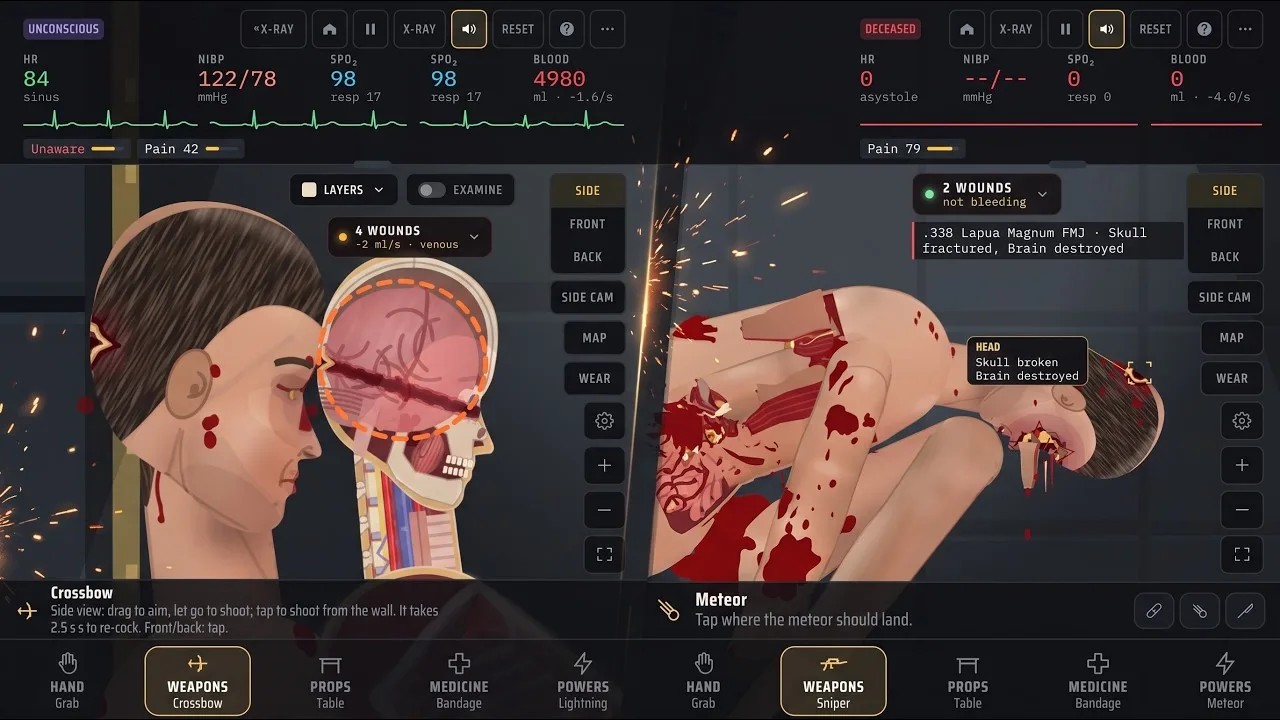
The Story changes give you a compact sequence of spaces with different equipment and threats. Your cell contains several tools, storage introduces a guard and a steel crate, and security adds a sentry alongside the jammed exit door.
| Room | Equipment or objects | Character or obstacle |
|---|---|---|
| Cell | Medicine cabinet, pistol, knife, and crowbar | Starting room |
| Storage | Steel crate | Guard |
| Security | Jammed exit door | Sentry gun |
Use the cell to get familiar with the available equipment before dealing with the next rooms. The pistol gives you a ranged weapon, while the knife now has a direct stabbing action through FIRE.
The crowbar is also present, but the room layout alone is not a complete escape solution. Focus on learning the interactions described below rather than assuming every nearby object has a required puzzle use.
The guard has a simulated body
The guard uses the same body system as your character, including organs, bleeding, wounds, and a soft protective vest. That makes the encounter part of the game’s anatomy simulation.
In v1.19, this guard stays in place and does not retaliate. Use that stationary encounter to practice aiming and turning before approaching the active sentry threat.
The distinction matters when reading Trauma lab patch notes: the guard’s detailed injury simulation and the sentry’s targeting behavior are separate features. A human body model does not mean this particular guard already patrols or fights.
The sentry searches with a red beam
The security-room sentry sweeps a red beam vertically. It opens fire after that beam finds you, giving its search pattern a visible cue.
Stay low behind cover while watching the beam. You can attack the sentry with your gun or knock it over with a kick.
Practice crouching, lying down, and getting back up before entering its line of sight. Those transitions received changes in v1.19, and the sentry encounter gives you a reason to use them deliberately.
Movement, Cover, and Controls in v1.19
Movement now responds more quickly when you start or stop. Crouching, lying down, and standing back up are faster too, making posture changes a practical part of moving through Story mode.
Two jumping problems also received fixes: repeatedly jumping no longer causes the previous glitch, and jumping while holding the gun drawn no longer launches your character into the ceiling.
Turning and weapon handling
With a weapon equipped, your character faces the direction you aim. Moving in the opposite direction makes you walk backward.
Keep your aim toward the threat when backing away. The new facing behavior lets you retreat while maintaining your weapon’s direction.
The gun rests in a lowered ready position and rises when you aim or shoot. You can also fire while lying down, so standing is no longer necessary for every shot.
How crate cover works
Press COVER (Q) beside a steel crate to sit against it. While tucked behind that cover, you are hidden.
Aiming over the crate lets you fire blind, but those shots have much lower accuracy. Settle behind the crate before firing, and account for the accuracy loss when choosing where to aim.
Do not assume every Q press means cover. Story mode and sandbox use different controls, and the default sandbox assignment for Q is previous tool.
| Action | Story mode behavior | Default sandbox binding |
|---|---|---|
| Use crate cover | COVER (Q), beside a steel crate | Q selects the previous tool |
| Use the knife | FIRE stabs in front of the character | Tool behavior depends on the selected tool and view |
| Select the next tool | — | E |
| Change tool mode | — | F |
| Open the tool menu | — | Tab |
| Cycle body views | — | V |
Sandbox bindings are remappable. Check your settings if a familiar key behaves differently after returning to the game.
The control-related Trauma lab patch notes are especially useful for anyone switching between modes. Learn Story’s cover action separately from the sandbox tool cycle so a familiar shortcut does not interrupt what you intended to do.
For sandbox inspection, the default keys also include X for X-ray, Z for examination with X-ray, and C for the organ chart. Use those inspection tools when comparing injuries after the birdshot adjustment.
Birdshot Changes and Sandbox Injury Checks
The v1.19 weapon adjustment changes how birdshot distributes damage. Each pellet now carries about 5 joules, producing numerous shallow wounds.
Birdshot remains dangerous at close range. At longer distances across a room, it no longer cuts major arteries in the way it previously did.
That is a meaningful change for sandbox experiments: the visible number of wounds and the depth of those wounds are different things. Inspect the subject instead of judging the result only by how many marks appear.
Keep birdshot separate from the Slug tool when comparing weapons. The Slug is described as a 12-gauge projectile carrying 3,200 joules and producing a single large wound. It is a different ammunition choice with different behavior.
Inspect before choosing an in-game treatment
Use the X-ray, examination, and organ-chart controls to check what happened beneath the surface. For a clearer comparison, repeat an experiment with the same weapon and view before changing another variable.
The medicine tools have distinct jobs within the simulation:
- Bandage: Tap to dress a wound or drag to wrap an area.
- Suture: Close a wound and tie off damaged vessels there; deeper internal bleeding continues.
- Surgery: Repair internal bleeding and injured organs in the selected body part, including removing bullets there.
- Forceps: Remove a lodged bullet.
- Gauze pack: Pack deep wounds, craters, and stumps.
These are game mechanics, not real-world treatment instructions.
The Trauma lab patch notes change birdshot’s damage behavior, while the current tool descriptions explain how to inspect and respond to the resulting injuries. Follow the injury you find: use the internal-repair tool for internal damage rather than repeatedly applying a surface treatment.
HUD Changes, Hit Labels, and Mobile Performance
The recent interface updates give returning players two things to check: the classic button arrangement from v1.17 and the optional wound label added in v1.18.
The classic HUD is back
Version 1.17 restores the earlier top-bar arrangement, including Side, Front, and Back controls, Side cam, Map, Wear, zoom, and full ammunition names.
Several visual changes remain, including the redesigned subject, scenes, weapon art, wound chip, and wound label. Returning to the older button arrangement did not remove those graphics.
Use the view buttons when you need a specific angle. In sandbox, the default V shortcut cycles side, front, and back views.
Hide the newest-wound label
The Trauma lab patch notes for version 1.18 add a toggle for the label attached to the newest wound. That label identifies the entry location and what the hit struck.
Open Options → Interface → On screen → Hit label to change it. The label starts enabled, and the game remembers your selection.
Leave it enabled while comparing shot placement. Turn it off when you want less text covering the subject.
| Control or setting | Function | Player action |
|---|---|---|
| Hit label | Identifies the newest wound and structures hit | Toggle it in Interface settings |
| Gore level | Affects the amount of gore shown | Lower it if the game lags |
| Side / Front / Back | Changes the body view | Select the angle you need |
| Zoom controls | Changes magnification | Adjust the view for inspection |
Phone performance improved in v1.17
The phone optimization reduces repeated rendering work. Body lighting is prepared once, floor shadows use a prepared shadow, and the skin texture is generated during loading.
The thin rim light along the subject’s back was removed because it was particularly costly to draw. The remaining shading preserves the redesigned appearance.
On phones, these changes roughly halve the work per frame and bring performance back around v1.14 levels. If the game still lags, lower the gore level in Options.
That performance work belongs to v1.17, while v1.19 focuses on Story, movement, and weapon behavior. Keeping those versions straight makes the Trauma lab patch notes easier to use when deciding which change affects your next session.
FAQ
What is the latest version in the Trauma lab patch notes?
The published browser build is v1.19. It rebuilds Story mode into three rooms and adds cover, directional facing, movement fixes, revised sentry behavior, and a birdshot damage adjustment.
How do you use cover in Story mode?
Stand beside a steel crate and press COVER (Q). Your character sits with their back against it and becomes hidden. Aiming over the crate allows blind fire with much lower accuracy.
Does the guard fight back in v1.19?
No. The guard has organs, bleeding, wounds, and a soft vest, but remains stationary and does not fight back in this version. The security-room sentry actively searches with a red beam and fires after detecting you.
How do you reduce lag on a phone?
Lower the gore level in Options. Version 1.17 also reduces rendering work through prepared lighting, shadows, and skin textures, so those optimizations are already part of the current browser build.
Continue with
 Trauma Lab Public Build vs Supporter Playtest: GuideTrauma lab public build vs supporter playtest explained: compare public v1.19, $5 supporter perks, early updates, Discord role, and the Steam launch key.
More in Versions
Trauma Lab Browser vs Download: Versions Explained
Trauma lab browser vs download: compare HTML5, Windows, and Android options, explore v1.19 features, and get practical tips for controls and smoother play.
Trauma Lab How to Update: Get the Latest Game Build
Trauma lab how to update guide for browser, Windows, and Android users. See v1.19 changes, Supporter access, and settings for smoother play after updates.
Trauma Lab Roadmap: V1.19 Updates and What's Ahead
Explore the Trauma Lab roadmap, v1.19 Story mode, mobile performance fixes, and $5 Supporter benefits. See what changed and how to follow future updates.
Trauma Lab Versions Guide: V1.19 Changes and Platforms
Use this Trauma lab versions guide to compare browser, Windows, and Android options, explore v1.19 Story changes, and understand updates before you play.
Join the community
Official channels for news, updates and player help: