
Trauma Lab Organs: How to Inspect, Repair, and Replace
Explore Trauma lab organs in v1.19 with X-ray controls, internal bleeding repairs, donor transplants, and serum differences. Learn which tools to use next.
Jump to
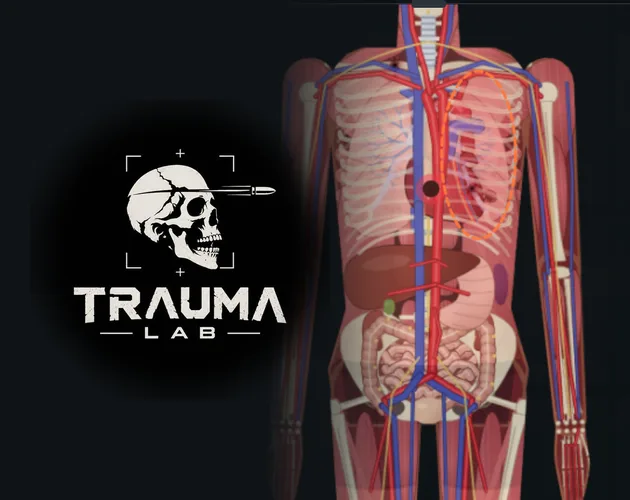
What Do Organs Do in Trauma Lab?
Trauma lab organs make an injury more than a mark on the skin. In v1.19, you can inspect internal damage, repair bleeding organs with Surgery, and replace a damaged organ with Transplant. Learning how Trauma lab organs connect to bleeding and heart function helps you choose a treatment that addresses what is happening beneath the wound.
The distinction matters because closing an external injury does not automatically resolve everything underneath it. Suture closes wounds and ties off torn vessels at the wound, but deep internal bleeding continues. Surgery handles internal bleeding, while Transplant replaces a damaged organ in the body part you select.
Think of those as different jobs. A visible opening, a bleeding organ, and a heart in ventricular fibrillation call for different tools. Repeatedly applying one treatment can leave another problem untouched.
The anatomy systems also extend into v1.19’s Story mode. Guards use the same body system as your character, including organs, bleeding, and wounds. The first guard does not move or fight back yet, but its body still has those systems.
For learning Trauma lab organs, start in Sandbox, where the inspection controls and medical tools give you a direct way to connect an injury with its treatment. Keep each experiment focused: inspect the damage, select a relevant tool, and examine the subject again before adding another intervention.
How to Inspect Internal Damage
Use the inspection controls before reaching for medicine. X-ray, Examine, the Organ chart, and the heart monitor give you several ways to investigate the subject instead of judging everything from the skin.
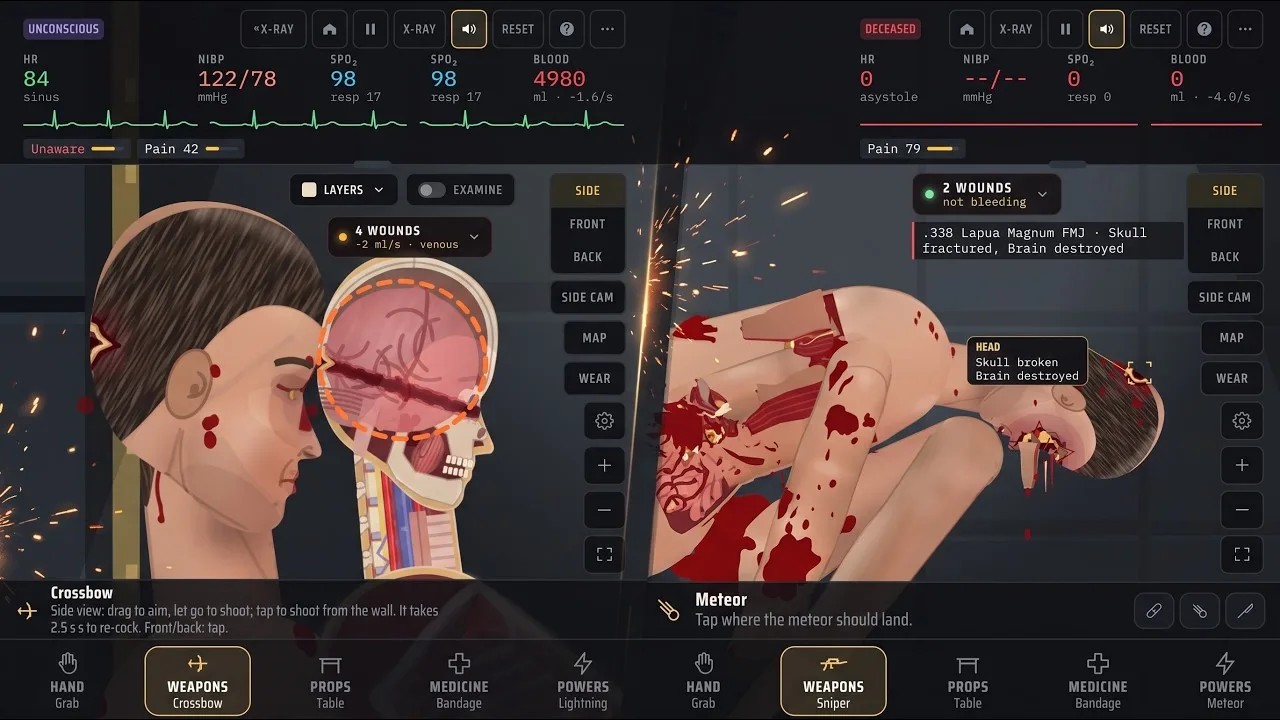
These are the default Sandbox bindings in v1.19. Keys are remappable, and Story uses different controls.
| Function | Default key | What it does |
|---|---|---|
| X-ray | X | Activates X-ray |
| Examine | Z | Examines with X-ray |
| Organ chart | C | Opens the Organ chart |
| Bullet paths | T | Displays bullet paths |
| Heart monitor size | M | Changes the heart monitor’s size |
| Next view | V | Cycles through side, front, and back views |
| Pause/play | Space | Pauses or resumes the simulation |
Open X-ray with X, then use Z for Examine. Bring up the Organ chart with C when you want to inspect the organ system. For projectile injuries, use T to display bullet paths alongside your other inspection tools.
You can also select Grab and tap a body part to examine it. That gives you another inspection action without relying entirely on keyboard shortcuts.
Use Space to control the pace of an experiment. The left and right arrow keys decrease and increase simulation speed, respectively. Slow down while learning the interface so you have time to distinguish the injury from the treatment you are applying.
The wound label provides another useful clue: it identifies where the newest wound entered and what it hit. In v1.19, its visibility is controlled through Options → Interface → On screen → Hit label. It is enabled by default, and the game remembers your choice.
Keep that label enabled while learning Trauma lab organs. Combine it with inspection rather than treating a single wound label as a complete account of the subject’s condition.
Repair Internal Bleeding With the Right Tool
The most useful distinction in treating Trauma lab organs is between closing a wound and repairing damage inside the body. Several medical tools interact with bleeding, but their descriptions give them different scopes.
| Tool | In-game function | Important distinction |
|---|---|---|
| Bandage | Dresses wounds or wraps an area | A dragged wrap covers wounds and burns underneath |
| Suture | Closes a wound and ties off torn vessels there | Deep internal bleeding continues |
| Surgery | Ties off bleeding vessels, repairs bleeding organs, and removes bullets in the selected body part | Requires sedation beforehand |
| Gauze pack | Packs deep wounds, craters, and stumps | Works on injuries that cannot be stitched |
| Tourniquet | Clamps bleeding vessels below a strap on an arm or leg | Acts on limb bleeding |
| Forceps | Removes a lodged bullet | Bullets left inside cause pain and slow bleeding |
When internal bleeding is the problem, sedate the subject before using Surgery, then tap the affected body part. Surgery works on that area, repairs bleeding organs and vessels, removes bullets there, and closes afterward.
Midazolam is the sedation drug that calms writhing. Keep its role separate from pain relief: Morphine provides strong pain relief and slows breathing, while Ketamine provides pain relief without slowing breathing and causes dissociation. Selecting a drug because it sounds powerful does not make it interchangeable with another.
Use Suture for the wound it can close. If an internal problem remains, switch to inspection and the relevant internal treatment rather than repeatedly stitching the same area.
Embedded bullets deserve attention, too. Forceps removes a lodged bullet when you tap the gray projectile. Surgery also removes bullets in the body part being operated on. Choose the action that matches the injury you are addressing.
Blood and Saline have different functions. Blood supplies 500 mL of O-negative whole blood per use. Saline supplies 500 mL of fluid, raises blood pressure, and dilutes oxygen-carrying blood. Neither description gives it Surgery’s role of repairing a bleeding organ.
Keep those jobs separate during treatment: repairing damage, removing a projectile, and replacing lost blood are distinct actions.
Transplants, Heart Treatment, and Serum Differences
For Trauma lab organs, Transplant is the tool that replaces rather than repairs. Tap a body part and it swaps that part’s most damaged organ for a donor organ.
That targeting detail matters. The action selects the most damaged organ within the body part you tap. Inspect the relevant region before using it so your treatment follows the damage you are trying to address.
Transplant also has two other functions: tapping a stump or detached limb reattaches the limb, and tapping the body after radiation performs a bone marrow transplant.
| Tool or substance | Stated effect in v1.19 |
|---|---|
| Transplant | Replaces a damaged organ, reattaches a limb, or performs a post-radiation bone marrow transplant |
| Defib | Treats ventricular fibrillation if the heart can still pump |
| Adrenaline | Raises heart rate and blood pressure, wakes the subject, and aids restart |
| Amiodarone | Helps defibrillation and blocks adrenaline-induced ventricular fibrillation |
| Super serum | Regenerates the body |
| Ultra serum | Revives the dead and regrows lost limbs |
| Inhibitor | Instantly cancels drugs, serums, poisons, and viruses |
Surgery and Transplant Address Different Problems
Surgery repairs bleeding organs and vessels. Transplant replaces the selected body part’s most damaged organ. Use that distinction when deciding what to apply after inspection.
A missing limb is another separate case. Transplant can sew a detached limb back on through its stump or the detached limb itself. Ultra serum has the stated ability to regrow lost limbs.
Keep those actions distinct while experimenting so you can understand which tool produced the result.
Defib Has a Specific Job
Defib is for ventricular fibrillation when the heart can still pump. It is not a universal answer to every collapsed or dead subject.
Adrenaline improves the odds of restart, while Amiodarone helps defibrillation. Use the heart-related tools in the context of the condition you are investigating instead of cycling through them without checking the subject.
Super Serum and Ultra Serum Are Different
In v1.19, Super serum is described as regenerating the body. Ultra serum explicitly revives the dead and regrows lost limbs.
Choose Ultra serum when you want those stated revival or regrowth effects. Keep serum experiments separate from repair experiments if your goal is to understand Surgery or Transplant; applying several systems together makes their individual effects harder to follow.
Remember that Inhibitor cancels serums along with drugs, poisons, and viruses. Use it deliberately when you want to cancel those effects.
Practice Organ Treatment Without Losing Track
Build your understanding of Trauma lab organs around a focused sequence: inspect, treat, and inspect again. Change one thing at a time so you can connect each action with the condition you are watching.
Use this checklist to organize a Sandbox session:
- Choose your view. Cycle with V between side, front, and back.
- Inspect the subject. Use X-ray, Examine, and the Organ chart.
- Identify the treatment’s scope. Separate wound closure, internal repair, organ replacement, and heart treatment.
- Prepare for procedures. Sedate before Surgery, Graft, or Bone plate.
- Apply one relevant intervention. Avoid stacking unrelated treatments.
- Examine again. Review the condition before choosing another action.
Several injuries can coexist, so keep the tool descriptions close to your decisions.
| Situation | Tool function to consider |
|---|---|
| A wound needs closing | Suture closes the wound and ties off vessels there |
| An organ is bleeding internally | Surgery repairs bleeding organs and vessels |
| A damaged organ needs replacement | Transplant replaces the most damaged organ in the tapped body part |
| A projectile remains lodged | Forceps removes it; Surgery removes bullets in the operated area |
| A deep crater or stump cannot be stitched | Gauze pack works on these injuries |
| Missing tissue needs reconstruction | Graft rebuilds tissue and covers the area |
Do not confuse skeletal repair with organ treatment. Bone plate sets and fixes fractures in areas including the limbs, hip, spine, skull, and chest. It requires sedation beforehand. Its function is different from repairing a bleeding organ, even when both injuries involve the same region.
Keep performance comfortable while practicing. If the simulation lags, lower the gore level in Options. That is the developer’s recommended adjustment for lag. Version 1.17 also introduced phone performance improvements that reduced repeated lighting and shadow work.
For a focused session with Trauma lab organs, leave the wound label visible and use the inspection controls regularly. Spend your attention on matching damage to treatment rather than adding more effects to an already complicated subject.
You can access the game through the Trauma Lab game page. The game remains in development, with HTML5, Windows, and Android platforms available.
FAQ
How do I inspect Trauma lab organs?
In v1.19 Sandbox, press X for X-ray, Z for Examine with X-ray, and C for the Organ chart. You can also tap a body part with Grab to examine it. These default bindings are remappable.
Does stitching a wound stop internal bleeding?
Suture closes the wound and ties off torn vessels at that location, but deep internal bleeding continues. Sedate the subject and use Surgery on the affected body part to repair bleeding organs and vessels.
How does the Transplant tool choose an organ?
Tap a body part to replace its most damaged organ with a donor organ. The same tool can reattach detached limbs and perform a bone marrow transplant after radiation.
Can Super serum revive the subject?
In v1.19, Ultra serum is the substance explicitly described as reviving the dead and regrowing lost limbs. Super serum is described as regenerating the body.
Continue with
 Trauma Lab Skin Guide: Burns, Wounds, and Healing TipsLearn how Trauma lab skin damage works in v1.19, compare bandages, Burn gel, and Graft, and use sandbox controls to inspect wounds and treat burns in-game.
More in Anatomy
Trauma Lab Anatomy Guide: Organs, X-Ray, and Healing
Use this Trauma lab anatomy guide to learn X-ray controls, examine organs, spot internal bleeding, and choose tools for wounds, fractures, and recovery.
Trauma Lab Bones: X-Ray Controls and Fracture Repair
Learn how Trauma lab bones work in v1.19, use X-ray controls, repair fractures with Bone plate, and understand limb reattachment, pain, and serum effects.
Trauma Lab Tissue Damage: Wounds and Repair Explained
Learn how Trauma lab tissue damage works in v1.19, inspect wounds, distinguish internal bleeding, and match injuries with the right in-game repair tools.
Trauma Lab Xray Guide: Controls and Anatomy Explained
Learn Trauma lab xray controls, examine injuries, follow bullet paths, and compare anatomy views in v1.19. Use this guide to navigate the sandbox tools.
Join the community
Official channels for news, updates and player help: