
Trauma Lab Anatomy Guide: Organs, X-Ray, and Healing
Use this Trauma lab anatomy guide to learn X-ray controls, examine organs, spot internal bleeding, and choose tools for wounds, fractures, and recovery.
Jump to
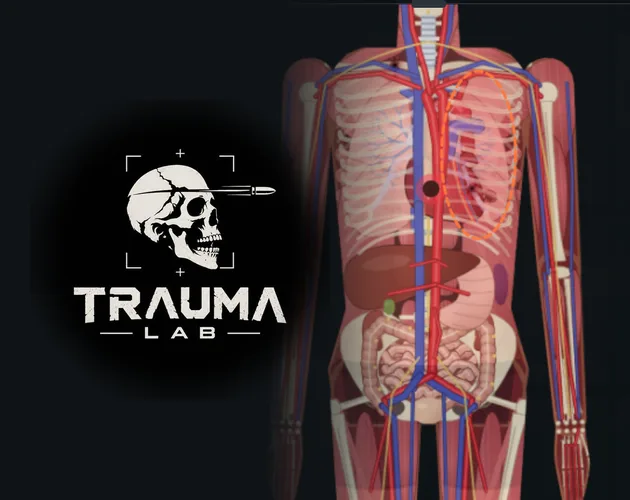
How to Read Anatomy in Trauma Lab
A stitched wound can look settled while internal bleeding keeps going. This Trauma lab anatomy guide explains how to inspect body parts, examine internal damage, and choose tools that address the injury underneath. Work through this Trauma lab anatomy guide with a fresh subject to connect each visible injury with the systems it affects.
In v1.19, your main inspection tools are X-ray, Examine, the organ chart, and the different body views. Together, they let you investigate damage beyond the newest wound label. The sandbox also gives you pause and speed controls, which are useful for separating an injury from its developing consequences.
Learn the Sandbox Inspection Controls
These are the default sandbox bindings. Keys are remappable, and Story mode uses different controls.
| Control | Default key | Function |
|---|---|---|
| X-ray | X | Toggle X-ray |
| Examine | Z | Examine with X-ray |
| Organ chart | C | Open the organ chart |
| Bullet paths | T | Display bullet paths |
| Change view | V | Cycle side, front, and back views |
| Heart monitor size | M | Change the monitor size |
| Pause/play | Space | Pause or resume |
| Slower | Left Arrow | Reduce simulation speed |
| Faster | Right Arrow | Increase simulation speed |
| Medicine category | 4 | Select Medicine |
Start by pausing and inspecting an undamaged subject. Open the organ chart, switch views, and familiarize yourself with the examination interface before introducing an injury. That baseline gives you something useful to compare against later.
The Grab tool also lets you tap a body part to examine it. Use the Move tool when you need to reposition the camera: dragging pans the view, while scrolling or pinching changes zoom.
Keep the newest wound label visible while learning. Its setting is under Options → Interface → On screen → Hit label, and it identifies the latest wound’s entry point and affected structure.
The central habit in this Trauma lab anatomy guide is simple: inspect beneath the visible mark before deciding what needs repair.
Match Wound Depth to the Right Repair
Trauma Lab distinguishes between dressing a wound, closing it, packing it, and operating on internal damage. Those actions have different jobs. A treatment that handles the surface can leave deeper bleeding untouched.
 Image: traumalab.itch.io
Suture makes this distinction especially clear. It closes a wound and ties off torn vessels at that location, but deep internal bleeding continues. Surgery operates within the selected body part, repairing bleeding organs, tying off bleeding vessels, and removing bullets there.
| Tool | In-game function | Important distinction |
|---|---|---|
| Bandage | Dress a wound or wrap across multiple wounds and burns | Applies coverage to the selected area |
| Suture | Close a wound and tie off vessels at the wound | Deep internal bleeding continues |
| Gauze pack | Pack deep wounds, craters, and stumps | Handles injuries that cannot be stitched |
| Surgery | Repair internal bleeding and remove bullets in a body part | Requires sedation beforehand |
| Forceps | Extract a lodged bullet | Targets the visible gray bullet |
| Tourniquet | Clamp bleeding vessels below a strap on an arm or leg | Works on limb bleeding |
For a projectile experiment, display bullet paths and use X-ray to inspect the injured region. A lodged bullet has its own consequences: it causes pain and slow bleeding while left inside. Forceps removes that projectile; Surgery includes bullet removal as part of operating on the selected body part.
Follow the tool instructions closely. Surgery calls for sedation first. Use the named sedative, Midazolam, rather than assuming every pain-relief drug does the same job.
For this Trauma lab anatomy guide, keep each repair step deliberate. Examine the injury, select the tool whose description matches it, apply that tool, and examine again. Avoid piling several treatments onto the subject before checking what changed.
That sequence makes the difference between wound closure and internal repair much easier to understand.
Track Blood Loss, Breathing, and Heart Function
Anatomy experiments become harder to interpret when injury effects overlap with drug effects. Morphine relieves pain but slows breathing. Adrenaline raises heart rate and blood pressure. A change after treatment can therefore reflect the treatment itself.
Keep those interactions in mind when using the heart monitor and examining the subject. Pain relief, blood replacement, and heart rhythm treatment serve different purposes within the simulation.
| Tool or drug | Stated in-game effect | Limitation or interaction |
|---|---|---|
| Blood | Transfuse 500 mL of O-negative whole blood | Adds blood without repairing the injury |
| Saline | Add 500 mL of fluid volume | Raises pressure but dilutes oxygen-carrying blood |
| TXA | Slow bleeding | Its function differs from closing or repairing wounds |
| Defib | Shock a fibrillating heart | Requires a heart that can still pump |
| Adrenaline | Raise heart rate and pressure; aid restart | Improves the odds of defibrillation |
| Amiodarone | Treat rhythm problems and help defibrillation | Also blocks adrenaline-induced ventricular fibrillation |
Blood and Saline are particularly easy to confuse because both use a 500 mL amount. Saline supplies volume without oxygen-carrying capacity. Blood supplies whole blood. Read that distinction before using either during a bleeding experiment.
Address the bleeding injury with the appropriate repair tool as well. Giving fluid does not perform the vessel repair described for Surgery or Suture.
Defib also has a specific target: ventricular fibrillation. Its description does not make it a universal revival tool. The condition of the heart still matters, even when Adrenaline improves the restart odds.
This Trauma lab anatomy guide also separates sedation from pain control. Midazolam sedates and calms movement; Morphine provides strong pain relief while slowing breathing. Ketamine provides pain relief without slowing breathing and causes dissociation.
Keep reversal tools matched to their stated effects:
- Naloxone reverses Morphine and Fentanyl.
- Flumazenil reverses Midazolam.
- Inhibitor cancels drugs, serums, poisons, and viruses.
Use targeted reversals when studying a particular drug effect. Inhibitor changes several categories at once, making it harder to isolate a single interaction.
Repair Bones, Burns, and Missing Tissue
Different anatomical structures call for different repair tools. Closing a skin wound does not perform the fracture fixation described for Bone plate. Likewise, Burn gel has a defined limit: it heals first- and second-degree burns, while third-degree burns need Graft.
Treat the repair menu as a set of specific functions. Read whether the tool addresses bone, skin, organs, missing tissue, or regeneration before applying it.
| Tool | What it does in v1.19 | Preparation or boundary |
|---|---|---|
| Bone plate | Set and fix fractures with plates and screws | Sedate first; pain still affects standing and limb use |
| Burn gel | Cool burns, ease pain, stop fluid loss, and heal first- and second-degree burns | Third-degree burns need Graft |
| Graft | Clean a large wound, tie off its vessels, and cover missing tissue | Sedate first |
| Transplant | Replace the most damaged organ in a selected body part | Also reattaches limbs and provides bone marrow transplantation |
| Super serum | Produce regeneration | Has a different description from Ultra serum |
| Ultra serum | Revive the dead and regrow lost limbs | Combines revival with limb restoration |
Bone plate applies to more than arms and legs. Its targets include the hip, spine, skull, and chest. After fixation, the subject can use the limb and stand again once pain allows. Keep that last condition in mind when interpreting movement after a repair.
Transplant is similarly broad, but its action depends on the target. Tapping a body part replaces its most damaged organ. Tapping a stump or detached limb reattaches the limb. After radiation exposure, tapping the body performs a bone marrow transplant.
Keep Super serum and Ultra serum distinct throughout this Trauma lab anatomy guide. Super serum’s stated function is regeneration. Ultra serum explicitly includes bringing the subject back from death and regrowing lost limbs.
For a structural repair experiment, inspect the damaged area before using a serum. Apply Bone plate, Graft, or Transplant as appropriate, then inspect again. Introducing regeneration at the same time makes it harder to connect the repair tool with the result.
Burn experiments also benefit from separating stages. Extinguisher stops active fire; Burn gel and Graft address the resulting injuries. The flame and the damaged tissue require different actions.
Build a Clear Anatomy Practice Routine
Keep your experiments narrow enough to explain. Changing the injury, medicine, simulation speed, and camera view together gives you too many moving parts to follow.
Use this Trauma lab anatomy guide as a repeatable inspection routine:
- Establish a baseline. Pause, open the organ chart, and examine the subject before changing anything.
- Introduce a single injury type. Avoid combining several weapons, chemicals, or powers in the same comparison.
- Inspect the affected area. Use X-ray and Examine; enable bullet paths for projectile injuries.
- Match treatment to damage. Distinguish surface closure, internal repair, fracture fixation, and tissue replacement.
- Check the result. Examine again before adding another intervention.
- Resume deliberately. Use pause and slower speed to follow developing changes.
Keep powerful recovery effects out of a focused comparison until you have inspected the injury and repair. Ultra serum’s revival and limb-regrowth functions can change several things you were trying to study separately.
For the keep-alive challenge, the default sandbox key is H. Familiarize yourself with inspection and repair tools before adding that challenge to your practice.
If performance gets in the way, lower the gore level in Options. Mobile performance improvements arrived in v1.17, including changes to body lighting, shadows, and texture preparation. Lowering gore remains the developer’s suggested response to lag.
Download or launch the game through the Trauma Lab game page. HTML5, Windows, and Android are the listed platforms; use the controls appropriate to your version and device.
FAQ
Which controls should I learn first in this Trauma lab anatomy guide?
Start with X for X-ray, Z for Examine with X-ray, C for the organ chart, and Space for pause. Add V to cycle body views and T to display bullet paths. These are remappable sandbox defaults.
Why does bleeding continue after I stitch a wound?
Suture closes the wound and ties off torn vessels at that location, but deep internal bleeding continues. Examine the injured body part and use Surgery for its internal bleeding repair function. Sedate the subject before operating.
Does Super serum revive the subject or restore missing limbs?
Super serum provides regeneration. Ultra serum is the recovery tool whose description explicitly includes revival and regrowing lost limbs. Transplant also lets you reattach a detached limb by targeting the limb or stump.
Does Story mode use the same controls as the sandbox?
Story and sandbox controls differ. In v1.19, Story includes a cell, storage, and security room. Q activates cover beside a steel crate in Story, while its default sandbox function selects the previous tool in the current tab.
Continue with
 Trauma Lab Bones: X-Ray Controls and Fracture RepairLearn how Trauma lab bones work in v1.19, use X-ray controls, repair fractures with Bone plate, and understand limb reattachment, pain, and serum effects.
More in Anatomy
Trauma Lab Organs: How to Inspect, Repair, and Replace
Explore Trauma lab organs in v1.19 with X-ray controls, internal bleeding repairs, donor transplants, and serum differences. Learn which tools to use next.
Trauma Lab Skin Guide: Burns, Wounds, and Healing Tips
Learn how Trauma lab skin damage works in v1.19, compare bandages, Burn gel, and Graft, and use sandbox controls to inspect wounds and treat burns in-game.
Trauma Lab Tissue Damage: Wounds and Repair Explained
Learn how Trauma lab tissue damage works in v1.19, inspect wounds, distinguish internal bleeding, and match injuries with the right in-game repair tools.
Trauma Lab Xray Guide: Controls and Anatomy Explained
Learn Trauma lab xray controls, examine injuries, follow bullet paths, and compare anatomy views in v1.19. Use this guide to navigate the sandbox tools.
Join the community
Official channels for news, updates and player help: