
Trauma Lab Tissue Damage: Wounds and Repair Explained
Learn how Trauma lab tissue damage works in v1.19, inspect wounds, distinguish internal bleeding, and match injuries with the right in-game repair tools.
Jump to
How Does Tissue Damage Work in Trauma Lab?
A closed wound can still leave you with a bleeding subject: Trauma lab tissue damage includes injuries that surface stitches cannot fix. Understanding Trauma lab tissue damage helps you choose between closing a cut, repairing internal bleeding, and rebuilding missing tissue. In v1.19, those jobs belong to different tools, so matching the repair to the injury matters more than covering every visible mark.
The anatomy sandbox connects wounds with damaged vessels, organs, bones, burns, and missing body parts. Several problems can overlap. Surgery repairs bleeding organs and vessels, while a Bone plate fixes fractures. A Graft handles missing tissue, and Transplant can replace a damaged organ or reattach a limb.
These are game systems, not real medical instructions. Learn the distinctions inside the simulation, especially when tools share similar descriptions.
| Damage category | Relevant v1.19 behavior | Repair distinction |
|---|---|---|
| Open wounds | Torn vessels can bleed at the wound | Suture closes the wound and ties off vessels there |
| Internal bleeding | Deep bleeding continues after surface stitching | Surgery repairs bleeding vessels and organs in the selected area |
| Burns | Burn gel treats first- and second-degree burns | Third-degree burns still require a Graft |
| Fractures | Broken bones have a dedicated repair tool | Bone plate sets and stabilizes the fracture |
| Missing tissue | Large wounds, craters, and stumps have separate treatments | Gauze pack packs them; Graft rebuilds and covers them |
Think in terms of the damaged structure. Skin closure, blood replacement, bone repair, and organ replacement solve different problems. If one tool leaves another injury untouched, switch to the tool assigned to that injury instead of repeating the same action.
Inspect Wounds Before Choosing a Tool
Trauma lab tissue damage is easier to follow when you use the inspection controls alongside the visible wound. The sandbox includes X-ray, Examine, an organ chart, and bullet-path displays. Keep those controls within reach while learning what each repair tool does.
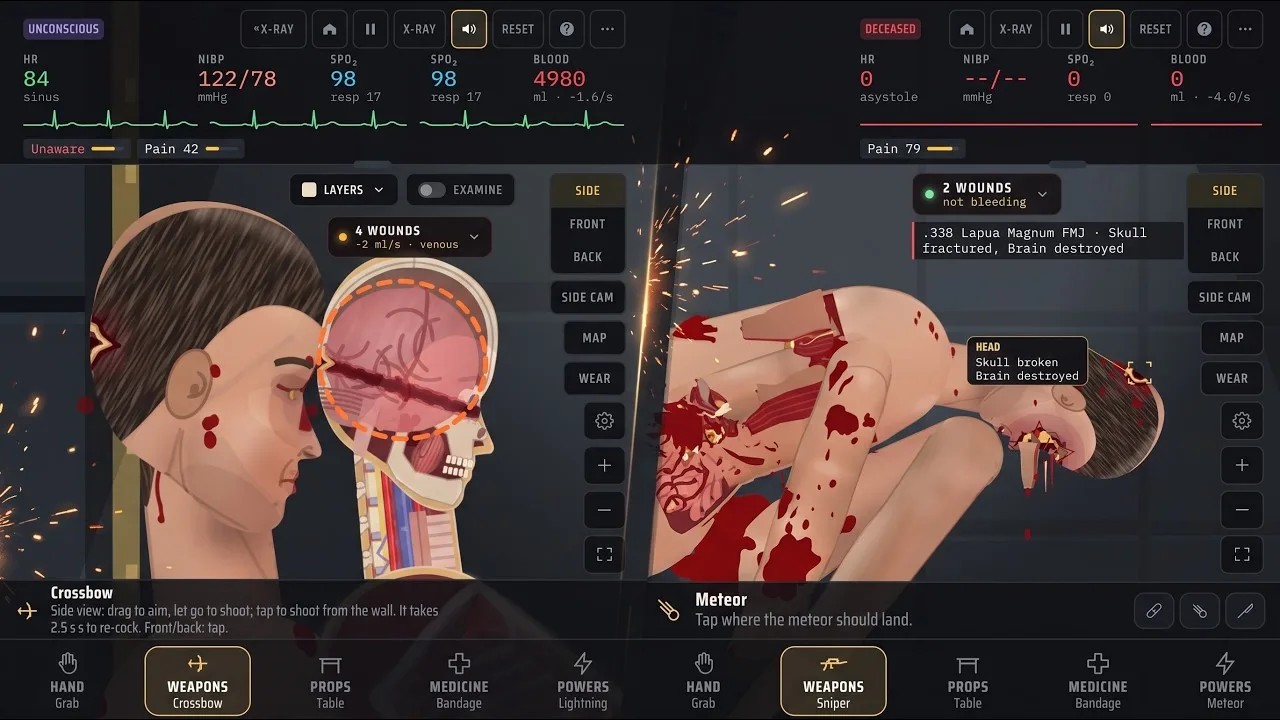
These are the default sandbox bindings in v1.19. Story controls differ, and keys can be remapped.
| Sandbox function | Default key | What it opens or changes |
|---|---|---|
| X-ray | X | Toggles X-ray |
| Examine | Z | Uses Examine with X-ray |
| Bullet paths | T | Displays bullet paths |
| Organ chart | C | Opens the organ chart |
| Next view | V | Cycles side, front, and back views |
| Pause / play | Space | Pauses or resumes the simulation |
| Simulation speed | Left / Right Arrow | Slows down or speeds up the simulation |
| Medicine category | 4 | Selects Medicine |
| Tool menu | Tab | Opens the tool menu |
Start by pausing when the scene becomes difficult to read. Switch views to inspect the affected area, then use the relevant display before selecting a treatment. The Grab tool also lets you tap a body part to examine it.
For projectile injuries, distinguish the path from a lodged projectile. Forceps removes a lodged bullet when you tap the gray bullet itself. Surgery also removes bullets in the area being operated on while repairing internal bleeding.
Arrows are a separate detail worth recognizing: the Compound bow uses cutting broadheads, and its arrows remain embedded. Do not assume every embedded object uses the bullet-specific Forceps interaction.
The newest wound also has an on-screen hit label, enabled by default. You can toggle it under Options → Interface → On screen → Hit label, and the game remembers that choice. Leave it enabled while learning injury locations; turn it off when you want a less crowded view.
Match Repair Tools to the Damage
The central Trauma lab tissue damage distinction is between closing a wound and repairing everything underneath it. Suture handles closure and torn vessels at the wound. It explicitly leaves deep internal bleeding running.
That difference explains why a visibly tidier subject can still need further treatment. Choose the tool by its actual function rather than how dramatic its animation or name sounds.
| Tool | What it does in v1.19 | Interaction or limitation |
|---|---|---|
| Bandage | Dresses wounds or wraps wounds and burns beneath it | Tap a wound or drag along the body |
| Suture | Closes a wound and ties off torn vessels there | Deep internal bleeding continues |
| Gauze pack | Packs deep wounds, craters, and stumps | Works on wounds that cannot be stitched |
| Surgery | Repairs internal bleeding and removes bullets in the selected area | Sedate the subject first |
| Graft | Rebuilds missing tissue and covers large wounds, craters, or stumps | Sedate the subject first |
| Tourniquet | Stops bleeding vessels below the strap on a limb | Apply to an arm or leg |
| Forceps | Removes a lodged bullet | Tap the gray bullet |
| Blood | Adds 500 ml of O-negative whole blood | Replaces blood rather than closing an injury |
| Saline | Adds 500 ml of fluid volume | Raises blood pressure but dilutes oxygen-carrying blood |
Separate wound closure from internal repair
Use Suture for a wound that needs stitching. When internal bleeding is involved, select Surgery for the affected body part rather than expecting another layer of stitches to reach deeper structures.
Surgery combines several actions: it ties off bleeding vessels, repairs bleeding organs, removes bullets in that area, and closes the operation. Its instructions require sedation first. Midazolam is the sedation tool that calms the subject's writhing.
Graft also requires sedation. It cleans the treated wound, ties off vessels within it, and covers the defect with a skin graft. That makes it a different intervention from simply packing the opening with gauze.
Separate fluid replacement from damage repair
Blood and Saline share a 500 ml amount, but they do different jobs. Blood supplies whole blood. Saline adds volume without oxygen-carrying blood and causes dilution.
Neither tool closes the wound responsible for the loss. Pair fluid replacement with the repair appropriate to the injury instead of treating a rising blood-pressure reading as proof that the damage is fixed.
Tourniquet is similarly specific: it clamps bleeding vessels below its position on an arm or leg. Its defined effect is limb bleeding control, so keep the injury location in mind.
Remove the correct object
Use Remove to take off bandages, stitches, tourniquets, and embedded objects such as a stuck knife. Use Forceps for the lodged-bullet interaction.
The distinction is practical when reviewing your work. Remove changes what is attached to the subject; it does not serve as a replacement for Surgery, Graft, or fracture repair.
Handle Burns, Broken Bones, and Missing Body Parts
Trauma lab tissue damage becomes more complicated when the injury includes something beyond an open wound. Burns, fractures, damaged organs, and detached limbs each have dedicated tools.
For active flames, use Extinguisher and hold over the fire. Lying down also smothers flames in the simulation. Once the fire is out, distinguish the burn treatment from the action that extinguished it.
Burn gel cools the area, reduces pain, stops fluid loss, and heals first- and second-degree burns. Third-degree burns still need a Graft. Applying more gel does not change that requirement.
| Injury or condition | Relevant tool | Supported action |
|---|---|---|
| Active fire | Extinguisher | Hold to spray over flames |
| First- or second-degree burns | Burn gel | Tap or rub over burned skin |
| Third-degree burns | Graft | Treat with the grafting tool |
| Broken bones | Bone plate | Set and secure the selected fracture |
| Damaged organ | Transplant | Replace the most damaged organ in the selected body part |
| Detached limb | Transplant | Tap the stump or detached limb to reattach it |
Bone plate works on broken arms, legs, the hip, spine, skull, and chest. Sedate the subject before using it. The tool straightens and fixes the bone with plates and screws, allowing limb use and standing again once pain permits.
That last condition matters: repaired bone and pain relief are separate parts of the simulation. Do not read difficulty standing as an automatic reason to repeat the fracture repair.
Transplant also has distinct targets. Selecting a body part replaces its most damaged organ; selecting a stump or detached limb performs reattachment. After radiation exposure, selecting the body allows a bone marrow transplant.
Understand the serum differences
The regeneration tools are tempting shortcuts, but their descriptions are not interchangeable.
Super serum gives the body regeneration. Ultra serum explicitly revives the dead and regrows lost limbs. Use that distinction when choosing between general regeneration and recovery from a missing body part.
Inhibitor instantly cancels every drug, serum, poison, and virus with one shot. Keep its broad effect in mind before using it during a serum experiment: it cancels the serum along with the other substances.
For learning individual repairs, work through the dedicated tools before introducing regeneration. That keeps the repair you are studying separate from the serum's effects.
Make Sandbox Experiments Easier to Read
Study Trauma lab tissue damage by changing one thing at a time. Use the sandbox's New subject (reset) option between comparisons, then repeat the injury and vary the repair. Resetting gives you a clearer comparison than stacking unrelated injuries and treatments on the same subject.
Build a short inspection routine:
- Pause when several events overlap.
- Check the injury from another view.
- Use X-ray, Examine, the organ chart, or bullet paths as appropriate.
- Select the tool assigned to the damaged structure.
- Resume and inspect again before adding another treatment.
Keep weapon behavior in mind when comparing wounds. In v1.19, shotgun birdshot creates many shallow injuries, with each pellet described as about 5 J. It remains dangerous up close, but no longer cuts major arteries from across the room. Avoid using older birdshot behavior as your expectation for the current version.
Some tools also combine damage with sealing. Plasma sword cuts through bone while sealing its wound, and Laser seals small vessels as it burns. Do not use external bleeding alone to judge the total injury when experimenting with those tools.
If performance makes Trauma lab tissue damage difficult to inspect, lower the gore setting in Options. The v1.17 update also reduced phone rendering work, including changes to body lighting, shadows, and skin textures. Keep visual clarity ahead of maximum gore while learning the anatomy systems.
You can play or download the game through the official Trauma lab game page, which offers HTML5, Windows, and Android versions.
FAQ
Why does Trauma lab tissue damage keep causing bleeding after stitches?
Suture closes a wound and ties off torn vessels at that wound, but deep internal bleeding continues. Use Surgery on the affected body part for internal vessel and organ repairs, with sedation first.
Can Burn gel repair every burn?
Burn gel heals first- and second-degree burns in v1.19. Third-degree burns still require a Graft. Extinguishing active flames is a separate action handled by Extinguisher or lying down.
What is the difference between Graft and Transplant?
Graft rebuilds missing tissue and covers large wounds, craters, and stumps. Transplant replaces the most damaged organ in a selected body part, reattaches detached limbs, and provides bone marrow transplantation after radiation exposure.
Does Super serum revive the subject or regrow limbs?
Super serum provides regeneration. Ultra serum is the tool explicitly assigned to reviving the dead and regrowing lost limbs. Choose Ultra serum when those are the effects you want.
Continue with
 Trauma Lab Xray Guide: Controls and Anatomy ExplainedLearn Trauma lab xray controls, examine injuries, follow bullet paths, and compare anatomy views in v1.19. Use this guide to navigate the sandbox tools.
More in Anatomy
Trauma Lab Anatomy Guide: Organs, X-Ray, and Healing
Use this Trauma lab anatomy guide to learn X-ray controls, examine organs, spot internal bleeding, and choose tools for wounds, fractures, and recovery.
Trauma Lab Bones: X-Ray Controls and Fracture Repair
Learn how Trauma lab bones work in v1.19, use X-ray controls, repair fractures with Bone plate, and understand limb reattachment, pain, and serum effects.
Trauma Lab Organs: How to Inspect, Repair, and Replace
Explore Trauma lab organs in v1.19 with X-ray controls, internal bleeding repairs, donor transplants, and serum differences. Learn which tools to use next.
Trauma Lab Skin Guide: Burns, Wounds, and Healing Tips
Learn how Trauma lab skin damage works in v1.19, compare bandages, Burn gel, and Graft, and use sandbox controls to inspect wounds and treat burns in-game.
Continue exploring
Trauma Lab Discord: Supporter Perks and Playtest Guide
Explore the Trauma Lab Discord, learn what the $5 Supporter option includes, and get practical tips for playtests, bug reports, updates, and mobile issues.
Trauma Lab Bullet Paths: Controls and Injury Guide
Learn Trauma lab bullet paths controls in v1.19, use X-ray and organ tools, compare weapon stats, and handle lodged bullets and internal bleeding in-game.
Join the community
Official channels for news, updates and player help: