
Trauma Lab Bones: X-Ray Controls and Fracture Repair
Learn how Trauma lab bones work in v1.19, use X-ray controls, repair fractures with Bone plate, and understand limb reattachment, pain, and serum effects.
Jump to
How Trauma lab bones work in v1.19
A repaired leg can still leave your subject on the floor while pain keeps him from standing. Trauma lab bones matter because fractures affect limb use and mobility, so setting a bone is only part of recovery. This Trauma lab bones guide walks you through the v1.19 sandbox controls, fracture repair, and the tools for reattaching or regrowing a missing limb.
The central repair tool is Bone plate. It works on broken arms and legs, plus the hip, spine, skull, and chest. Using it sets the damaged bone straight and secures it with a steel plate and screws. The subject can use the limb and stand again once pain allows.
That last detail matters. Bone repair, wound closure, bleeding control, and pain relief have separate jobs. A fracture can share a body region with an open wound or internal bleeding, and fixing the skeleton does not replace the tools designed for those other injuries.
Keep these distinctions in mind:
- Broken bone: Use Bone plate to set and stabilize it.
- Detached limb: Use Transplant to reattach it.
- Missing limb: Ultra serum has limb-regrowth functionality.
- Bleeding wound: Choose the treatment that matches the wound rather than assuming a bone repair handles everything.
Trauma Lab is still in development. The mechanics and keyboard shortcuts below apply to v1.19 sandbox mode; Story mode uses different controls.
Official page: Trauma Lab (traumalab.itch.io)
Use X-ray and Examine before choosing a repair
Start your Trauma lab bones checks with the inspection controls. X toggles X-ray, while Z activates Examine with X-ray. Grab also lets you examine a body part by tapping it.
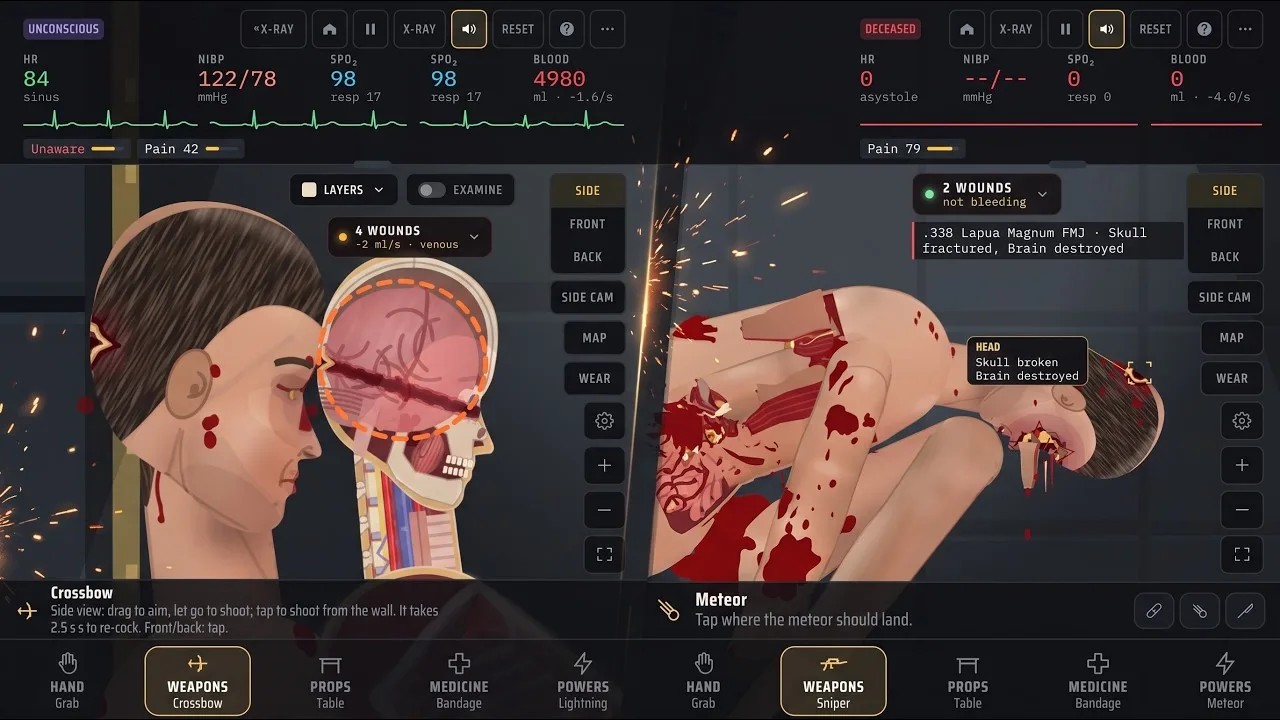
These controls give you a way to inspect the subject before switching to treatment. Use them alongside the camera views instead of repeatedly dragging an injured limb around.
| Sandbox action | Default control | Function |
|---|---|---|
| X-ray | X | Toggle X-ray |
| Examine | Z | Examine with X-ray |
| Change view | V | Cycle side, front, and back views |
| Medicine tools | 4 | Select the medicine tab |
| Tool menu | Tab | Open the tool menu |
| Previous / next tool | Q / E | Cycle tools within the selected tab |
| Pause / play | Space | Pause or resume the simulation |
| Fit to screen | 0 | Fit the subject to the screen |
The default bindings are remappable. Check your current bindings if a key does something different.
Get the camera positioned first
Use V to switch between side, front, and back views. Zoom with = and -, or use the Move tool to pan and zoom. Move supports dragging to pan and scrolling or pinching to zoom.
Frame the injured region before selecting Bone plate. For a closer inspection, zoom in; to regain an overview, press 0 to fit the subject to the screen.
Pause while organizing your inspection and selecting tools. Resume when you are ready to observe the subject’s response. Keeping camera movement, tool selection, and observation separate makes a complicated injury easier to follow.
Avoid mixing Story instructions into this workflow. For example, Q cycles to the previous sandbox tool, while v1.19 Story mode uses Q for taking cover beside a steel crate.
How to repair broken bones with Bone plate
For Trauma lab bones that are fractured but still attached, select Bone plate. Its treatment opens the area over the break, aligns the bone, and fixes it with a plate and screws.
Sedate the subject first. Midazolam is the drug specifically described as providing sedation and calming writhing. Pain relief is a separate function: Morphine provides strong pain relief but slows breathing, while Ketamine provides pain relief without slowing breathing and causes dissociation.
Use this sandbox sequence:
- Inspect the injured region. Toggle X-ray with X and use Examine with Z.
- Position the camera. Switch views or adjust the zoom so you can target the affected body part.
- Sedate the subject. Use the sedation tool before the Bone plate procedure.
- Select Bone plate. Press 4 for medicine, then choose it through the tool menu or cycle with Q and E.
- Tap the broken body region. Bone plate supports the areas listed below.
- Reassess the subject. Check limb use, pain, wounds, and bleeding before adding another treatment.
| Fractured region | Bone plate action |
|---|---|
| Arm | Sets the broken bone and secures it with a plate and screws |
| Leg | Sets and fixes the fracture, allowing limb use once pain permits |
| Hip | Provides fracture fixation |
| Spine | Provides fracture fixation |
| Skull | Provides fracture fixation |
| Chest | Provides fracture fixation |
The procedure supports more than obvious arm and leg breaks. Remember the hip, spine, skull, and chest when choosing a repair target.
A fixed bone does not guarantee immediate movement
The subject’s ability to stand after fixation still depends on pain. If you use Bone plate and he remains down, reassess pain alongside the other injuries instead of treating standing as the only measure of success.
Keep the treatment sequence readable. Inspect, perform the relevant repair, and observe before introducing more tools. Applying several drugs and procedures together makes it harder to understand which change affected the subject.
For a focused fracture exercise, use a fresh subject through New subject (reset). That gives you a separate starting point for comparing another injury or treatment sequence.
Bone plate, Transplant, and serums have different jobs
The most useful Trauma lab bones distinction is between fixing a break, reattaching a limb, and regrowing one. Those actions belong to different tools.
Bone plate stabilizes fractures. Transplant can sew a detached limb back on. Ultra serum can regrow lost limbs and bring back the dead. Super serum has the broader description of experimental body regeneration.
| Tool | Function in v1.19 | Player action |
|---|---|---|
| Bone plate | Aligns and fixes broken bones with plates and screws | Tap a supported fractured body region after sedation |
| Transplant | Reattaches limbs and replaces damaged organs | Tap a stump or detached limb for reattachment |
| Ultra serum | Revives the dead and regrows lost limbs | Select it for its revival and regrowth functions |
| Super serum | Provides experimental body regeneration | Keep its general regeneration role separate from Ultra serum’s named functions |
| Surgery | Repairs internal bleeding and removes bullets in the treated region | Sedate, then tap the affected body part |
| Suture | Closes a wound and ties off torn vessels there | Tap the wound; deep internal bleeding continues |
For a detached limb, target either the stump or the severed limb with Transplant. Bone plate’s role is fracture fixation, so choose the reattachment tool when the limb has come off.
For a lost limb, Ultra serum is the option explicitly equipped for regrowth. Keep the serum names straight when navigating the menu: Ultra serum and Super serum are separate items.
Treat the surrounding injury separately
A bone injury can be only one part of the problem. Match the remaining treatment to what needs attention:
- Use Surgery for internal bleeding in a body region; sedate first.
- Use Suture to close a wound and tie off vessels at that wound.
- Use Gauze pack for deep wounds, craters, and stumps that cannot be stitched.
- Use Forceps to remove a lodged bullet.
- Use Transplant when limb reattachment is the task.
Suture does not stop deep internal bleeding. Surgery addresses internal bleeding and also removes bullets in the operated region. Those distinctions matter when a fracture accompanies a penetrating injury: choose each treatment for its actual function.
Compare bone damage without losing track of the subject
Trauma lab bones react to different damage mechanics. Some tools describe fractures, others split or cut through bone, and Freeze changes how limbs respond to impacts.
| Tool or power | Bone-related behavior |
|---|---|
| Baseball bat | Produces bruising and fractures |
| Hammer | Produces depressed fractures |
| Axe | Delivers heavy chops that split bone |
| Plasma sword | Cuts through bone and seals the wound |
| Freeze | Makes frozen limbs shatter when shot or dropped hard |
| Rope | Excessive pulling can make a joint give way |
Use these differences to structure a sandbox comparison. Pick a tool, inspect the resulting injury, and choose the corresponding repair. Reset the subject before moving to another comparison if you want to keep previous damage and treatments out of the next exercise.
With melee weapons, follow the controls for the current view. In side view, the bat and hammer are grabbed and swung; in front or back view, tapping performs the strike. The axe follows that same broad distinction between swinging in side view and tapping to chop in front or back.
Keep fracture tests separate from missing-limb tests
Start with a fracture-focused tool when practicing Bone plate. The bat’s description includes fractures, making its damage relevant to a fixation exercise.
Switch to a separate subject when exploring reattachment or regrowth. That keeps the questions distinct: whether Bone plate restores function after a break, whether Transplant reconnects a detached limb, or how Ultra serum handles a lost limb.
Freeze needs extra attention because prolonged freezing kills the subject. For a frozen-limb exercise, focus on the stated interaction—shattering after a shot or hard drop—rather than leaving the subject frozen while browsing tools.
Reduce lag before continuing
If the simulation becomes sluggish, lower the gore level in Options. Press O to open Options with the default sandbox bindings.
Version 1.17 introduced phone performance improvements involving body lighting, floor shadows, and skin textures. Lowering gore remains a practical adjustment when performance interferes with camera control or treatment selection.
Use a comfortable view and manageable visual settings for repeated Trauma lab bones exercises. Clear targeting and a readable treatment sequence help you follow what changes after each action.
FAQ
How do you fix Trauma lab bones?
In v1.19 sandbox mode, sedate the subject, select Bone plate, and tap the fractured region. It supports broken arms, legs, the hip, spine, skull, and chest. The procedure aligns and fixes the bone with plates and screws.
What are the X-ray and Examine keys?
The default sandbox bindings are X for X-ray and Z for Examine with X-ray. Press V to cycle side, front, and back views. These bindings are remappable, and Story mode has different controls.
Why is the subject still unable to stand after Bone plate?
Standing and limb use after fixation depend on pain allowing movement. Reassess pain and other injuries after the repair. Bone fixation, wound treatment, and internal bleeding control have separate functions.
Can you reattach or regrow a missing limb?
Transplant reattaches a detached limb when you tap the stump or severed limb. Ultra serum regrows lost limbs and can revive the dead. Use Bone plate for fractures and choose the appropriate limb treatment when the injury involves separation or loss.
Continue with
 Trauma Lab Organs: How to Inspect, Repair, and ReplaceExplore Trauma lab organs in v1.19 with X-ray controls, internal bleeding repairs, donor transplants, and serum differences. Learn which tools to use next.
More in Anatomy
Trauma Lab Anatomy Guide: Organs, X-Ray, and Healing
Use this Trauma lab anatomy guide to learn X-ray controls, examine organs, spot internal bleeding, and choose tools for wounds, fractures, and recovery.
Trauma Lab Skin Guide: Burns, Wounds, and Healing Tips
Learn how Trauma lab skin damage works in v1.19, compare bandages, Burn gel, and Graft, and use sandbox controls to inspect wounds and treat burns in-game.
Trauma Lab Tissue Damage: Wounds and Repair Explained
Learn how Trauma lab tissue damage works in v1.19, inspect wounds, distinguish internal bleeding, and match injuries with the right in-game repair tools.
Trauma Lab Xray Guide: Controls and Anatomy Explained
Learn Trauma lab xray controls, examine injuries, follow bullet paths, and compare anatomy views in v1.19. Use this guide to navigate the sandbox tools.
Join the community
Official channels for news, updates and player help: